
Most beginner dropshipping advice tells you what dropshipping is. It rarely tells you what to actually do on Monday morning when you sit down to build a store. This page is the launch pad. It walks through the real steps to start a Shopify dropshipping store, the money you actually need, the things people get wrong in the first week, and where the work gets a lot easier.
If you are still figuring out what dropshipping is in the first place, the dropshipping basics guide is a better starting point. If you are ready to build, keep reading.
Short Answer
To start a dropshipping business on Shopify, you need a clear niche, a Shopify account, a supplier, a properly built storefront, and a plan for getting traffic. Most of the time and money beginners spend goes into the storefront and the early product testing, not into inventory. The faster you get to a real, finished store, the faster you can learn what is actually working.
The Launch in Seven Steps
This is the version of the process that ignores the noise and sticks to what matters.
- Pick a niche you can describe in one sentence. “Dog owners who travel” beats “pet products.” A clear niche shapes every other decision.
- Open a Shopify account. Use the trial to set up the foundation. You only need to commit to a paid plan when you are ready to launch.
- Choose a supplier model. Most beginners pick a marketplace app, a print-on-demand partner, or a private agent. Each has tradeoffs in shipping speed, product range, and margin.
- Build the store structure. Homepage, collections, product pages, about, contact, shipping policy, returns, privacy, terms. This is the part that takes the longest if you do it manually.
- Write product copy that speaks to the buyer. Supplier descriptions are not enough. The page has to explain who the product is for and why it is worth the price.
- Set prices that actually leave a margin. Account for product cost, shipping, payment fees, app fees, returns, and ad budget before deciding what to charge.
- Pick one traffic channel and start. Organic content, paid ads, or a niche community. Not all three at once.
Each step has its own decisions, and the rest of this guide will go into them in detail. The point right now is that this is a finite list. There is no ninth secret step.
How to Set Up a Shopify Dropshipping Store
When a customer buys a product on your Shopify store, Shopify takes the payment and triggers an order. That order is sent to your supplier through an app or integration. The supplier picks, packs, and ships the product directly to the customer.
You handle the parts the customer sees: the storefront, the product pages, the support, and the marketing. The supplier handles fulfillment in the background. The customer never knows your supplier exists, which is why supplier choice quietly affects your brand more than most beginners think. The how to find dropshipping suppliers guide walks the search-and-vet workflow that prevents most of those problems before a single order ships.
Shopify gives you the platform, the checkout, the payment processing, and the app marketplace. It does not give you the niche, the product selection, the copy, or the traffic. Those are still your job. Theme selection matters here too. Picking a focused, conversion-friendly theme up front saves rework later. There is a dedicated guide on choosing the best Shopify dropshipping theme when you are ready to make that call. For a page-by-page breakdown of what the site itself should contain, the home page, product pages, collection pages, and trust elements, read How to Set Up a Dropshipping Website.
What You Need Before You Start
You can start a Shopify dropshipping store with a fairly short list of things, but the list is not zero.
You need:
- A Shopify account
- A clear niche or product direction
- Access to at least one supplier or supplier app
- A payment method that works in your country
- A way to write or edit product page copy
- A traffic plan you can actually follow
- A small budget for fees, apps, and early testing
- Time to keep working on the store after launch
You do not need:
- A registered company on day one in most countries
- A large product catalog
- A custom logo from a designer
- A custom theme built by a developer
- An audience built before you launch
- A perfect store before you go live
The store will keep changing for the first few months. Beginners who wait for “ready” usually never launch.
For the longer version that splits each requirement into must-haves, should-haves, and the things people only think they need, the full requirements walkthrough covers each item with concrete numbers, skill notes, and a ten-item realistic minimum bundle.
How Much Does It Cost to Start Dropshipping on Shopify?
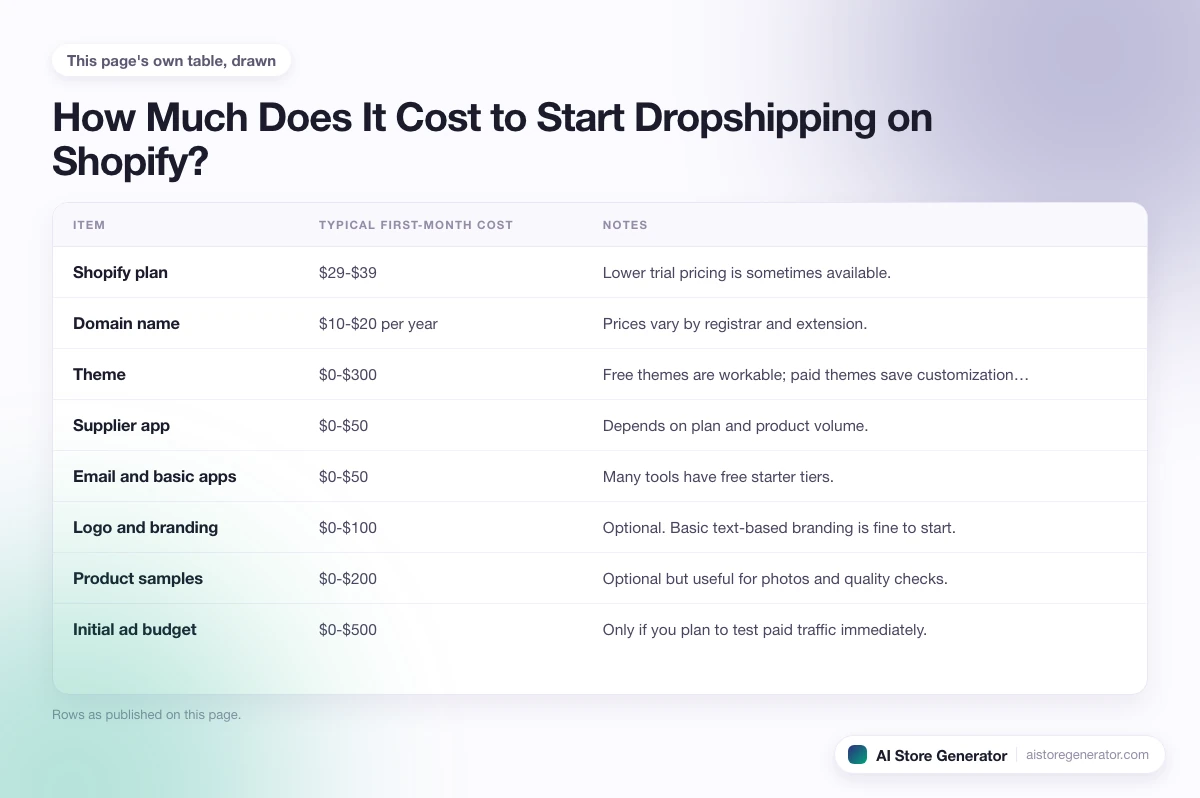
The honest answer is that the cost depends on how much of the work you do yourself. Here is a realistic breakdown for the first month or two.
| Item | Typical first-month cost | Notes |
|---|---|---|
| Shopify plan | $29-$39 | Lower trial pricing is sometimes available. |
| Domain name | $10-$20 per year | Prices vary by registrar and extension. |
| Theme | $0-$300 | Free themes are workable; paid themes save customization time. |
| Supplier app | $0-$50 | Depends on plan and product volume. |
| Email and basic apps | $0-$50 | Many tools have free starter tiers. |
| Logo and branding | $0-$100 | Optional. Basic text-based branding is fine to start. |
| Product samples | $0-$200 | Optional but useful for photos and quality checks. |
| Initial ad budget | $0-$500 | Only if you plan to test paid traffic immediately. |
Total for a budget launch lands around $50-$150 per month if you skip ads at first. Total for a faster, paid-traffic launch lands closer to $500-$1,000 in the first month. For the honest version of the lower end, including what is realistic at the smallest budgets, see can I start Shopify dropshipping with $100?
The biggest hidden cost is time. Building a store properly takes far more hours than most guides admit.
Where AI Store Generator Fits
This is the slow part of the process for most beginners: turning a blank Shopify account into a store that actually looks and feels like a store. Homepage layout, collections, product pages, copy, pricing, structure, internal links, supporting pages. All of it has to be built before any traffic plan starts to matter.
The AI dropshipping store builder handles that part. You describe the store you want, and it builds a Shopify dropshipping store with products, product pages, collections, and an SEO-first structure already in place. Instead of staring at an empty admin panel, you are reviewing a real store and deciding what to change.
You still own the business. You pick the niche direction, review the products, set the final pricing, connect Shopify, and run the marketing. The difference is that you are doing those things on top of a finished store, not inside an empty one.
For people who already know what they want to sell, this turns a multi-week setup into a much shorter review session.
Common Mistakes That Stall New Stores
Most stores that fail in the first three months fail for the same reasons. Knowing the list ahead of time is half the fix.
- Picking a product before picking a customer. A clear customer makes every other choice easier.
- Importing too many products. A focused store of 10-30 well-chosen products usually outperforms a store with 300 random ones. The right number depends on your ad budget and niche depth.
- Skipping product page copy. A page that reads like a supplier feed will not convert paid traffic.
- Pricing emotionally. Prices that feel “fair” often skip costs that eat the margin.
- Launching ads to a thin homepage. Ads should land on a real product or collection page, not a generic homepage.
- Treating SEO as something to handle later. Late SEO is slow SEO.
- Switching niches every two weeks. Constant pivots stop the store from ever building data.
- Ignoring policies and trust pages. Shipping, returns, and contact information are not optional for buyers.
- Mixing too many supplier types. Mixed shipping speeds make the customer experience harder to manage.
These are not personal failings. They are the result of advice that focused on products and ads instead of the store itself.
A Simple Launch Readiness Check
Before you spend on traffic, run through this short list. If you cannot answer most of these, the issue is the foundation, not the products.
- Can you describe your customer in one sentence?
- Does your homepage explain the store in five seconds?
- Do your product pages read like real product pages, not feeds?
- Do you have at least three to five collection pages built around real searches?
- Are your shipping, returns, and contact pages live and clear?
- Do your prices cover product cost, fees, returns, and a reasonable ad budget?
- Do you have one specific traffic channel you will work on this month?
- Do you have a way to handle customer questions within a day?
If any answer is no, fix that before paying for traffic. Traffic to a store that is not ready burns budget without giving you data.
More on Starting Your Shopify Dropshipping Store
For the broader beginner picture before drilling into launch specifics, the Dropshipping Basics for Shopify guide explains the model itself, what beginners get wrong, and where dropshipping fits into a real Shopify ecommerce business.
Three guides go deeper into specific parts of the launch:
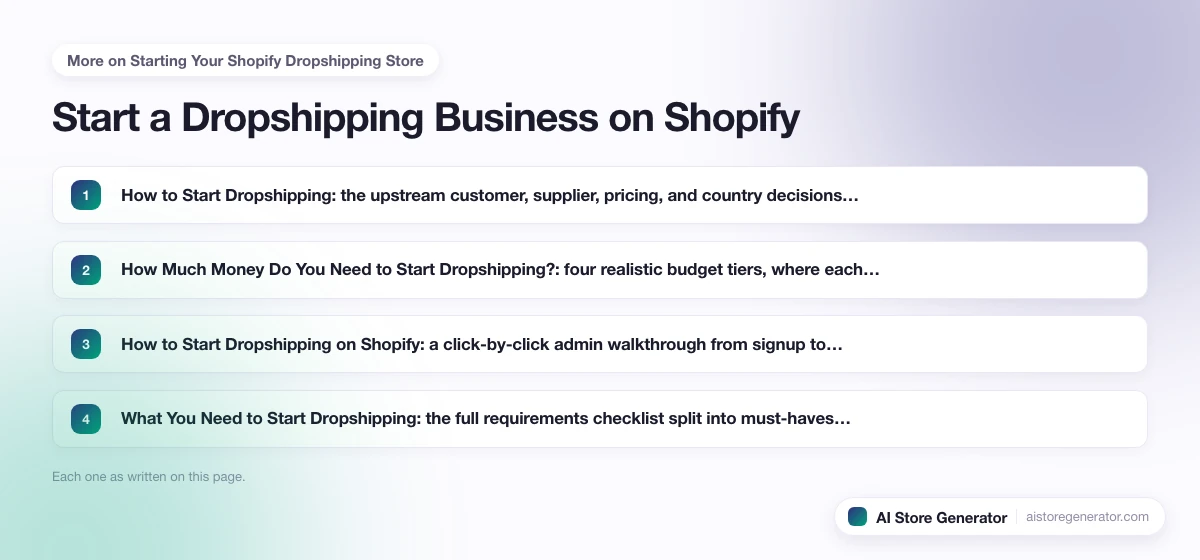
- How to Start Dropshipping: the upstream customer, supplier, pricing, and country decisions that come before the Shopify build, plus a realistic 30-day plan.
- How Much Money Do You Need to Start Dropshipping?: four realistic budget tiers, where each dollar goes, the hidden costs guides skip, and the break-even math.
- How to Start Dropshipping on Shopify: a click-by-click admin walkthrough from signup to launch, with the exact menu paths and a pre-launch test order.
- What You Need to Start Dropshipping: the full requirements checklist split into must-haves, should-haves, and the things people only think they need, plus a ten-item realistic minimum bundle.
The launch guides above cover the generic setup decisions. For a niche-specific angle, how to start a dropshipping clothing business walks through the same steps applied to an apparel customer, with sample-ordering, sizing, and pricing math tailored to clothing.
Build the Store Before You Overthink It
It is easy to spend weeks reading about dropshipping and still have no store. Learning matters, but at some point you need something real to look at. A store structure. Product pages. Collections. A homepage. A direction.
Visit AI Store Generator to build your Shopify dropshipping store now. From there, you decide what to keep, what to change, connect Shopify, pick a supplier setup with the help of dropshipping suppliers for Shopify, work through Shopify dropshipping operations once orders start landing, and shape the longer arc with Shopify dropshipping strategy. Then you can start working on traffic instead of getting stuck at the setup stage.
FAQ
How do I start a dropshipping business on Shopify?
Pick a niche you can describe in one sentence, open a Shopify account, choose a supplier or supplier app, build the storefront with product pages and collections, set realistic prices, and pick one traffic channel to start with. The work is finite, just larger than most beginner guides admit.
Is dropshipping on Shopify still profitable?
Yes, Shopify dropshipping is still profitable, but the easy-money version sold by guru videos is mostly gone. Profitable stores in 2026 win through niche focus, real product pages, healthy margins, and consistent traffic, not by importing a trending product and running ads.
How much money do I need to start dropshipping on Shopify?
A realistic first-month budget is $50-$150 if you skip paid ads, or $500-$1,000 if you want to test paid traffic right away. Shopify, a domain, a few apps, and small early-test costs make up the bulk of it. You do not need money for inventory, which is the part dropshipping removes.
Can I start a Shopify dropshipping store for free?
You can get very close to free using Shopify’s trial period and free dropshipping app tiers, but realistically you will spend something on the domain, the paid Shopify plan once the trial ends, and small ad or sample tests. “Free to start” is a fair description; “free to run” is not. For the honest version of what is genuinely free, what you cannot avoid paying for, and the two paths that actually work at zero dollars, read how to start dropshipping for free.
Do you need a license to dropship on Shopify?
Shopify itself does not require a business license to open a store, but local laws may. Many countries let you start without a registered company and add formal registration once revenue justifies it. Tax, sales-tax, and import rules vary, so confirm requirements where you live before scaling spend.
How long does it take to make money with Shopify dropshipping?
Most stores take three to six months to gain traction and another six to twelve months to reach steady income. Stores that skip the foundation work usually take longer or never get there. Time to first sale is much faster than time to a sustainable income.
Is Shopify good for dropshipping beginners?
Shopify is one of the most beginner-friendly platforms because it covers hosting, checkout, payments, taxes, and the app marketplace in one place. The platform is easy. Niche selection, product pages, pricing, and traffic are still the parts beginners need to learn.
How do I set up a Shopify dropshipping store step by step?
Open a Shopify account, choose a niche and supplier, install a dropshipping app to import products, pick and customize a theme, write real product page copy, set up collections and policy pages, configure payments and shipping, and only then start sending traffic. AI Store Generator handles the storefront and product page setup so you can focus on the launch decisions.
Should I pick a niche or just sell trending products?
Pick a niche. Trending products without a niche tend to produce one-off sales that never repeat. A niche store builds a customer profile, repeat traffic, and the kind of structure search engines and shoppers can recognize.
What is the most common mistake when starting a dropshipping business?
Treating the store like a product catalog instead of a real ecommerce business. The product matters, but a strong product on a thin store still loses to a focused store with clear pages, real copy, and trust signals.
How does AI Store Generator help with starting a Shopify dropshipping store?
AI Store Generator builds the Shopify storefront for you, with products, product pages, collections, and SEO structure already set up. You review the store, adjust what you want, connect your Shopify account, and start working on traffic. It removes the setup phase that slows most beginners down.