
The Shopify Theme Store is Shopify’s own marketplace for store designs, found at themes.shopify.com and inside every Shopify admin. Most guides treat it as a catalogue: here are the prettiest themes, pick one. That skips the part that actually costs you money. The Theme Store is a shop with rules. A theme has to clear a published quality bar before it is listed, the free trial has hard limits, and a paid theme is final sale and tied to one store. Know those rules and you can shortlist, test and buy without paying for a design you then abandon.
What the Shopify Theme Store Is
It is the only place Shopify itself sells themes. Free themes are made by Shopify; paid themes are made by independent theme developers and sold through Shopify, which handles the payment and the licence. You reach it from your admin under Online Store, then Themes, then the link to visit the Theme Store, or by going to the site directly.
Each theme usually comes in several styles, which are preset colour, font and layout combinations of the same code. The store lists styles separately, so the number of listings is higher than the number of distinct themes. Buying one style gets you the theme, and you can switch between its styles in the editor afterwards.
The free list is short. We counted 24 free themes on 6 October 2026, and our guide to the best free Shopify themes compares them feature by feature. Everything else in the store costs money.
What a Theme Has to Pass Before It Is Listed
This is the part nobody quotes, and it is the most useful thing to know before you shop. Shopify publishes the requirements a theme must meet to be accepted into the store. The ones that matter to a buyer:
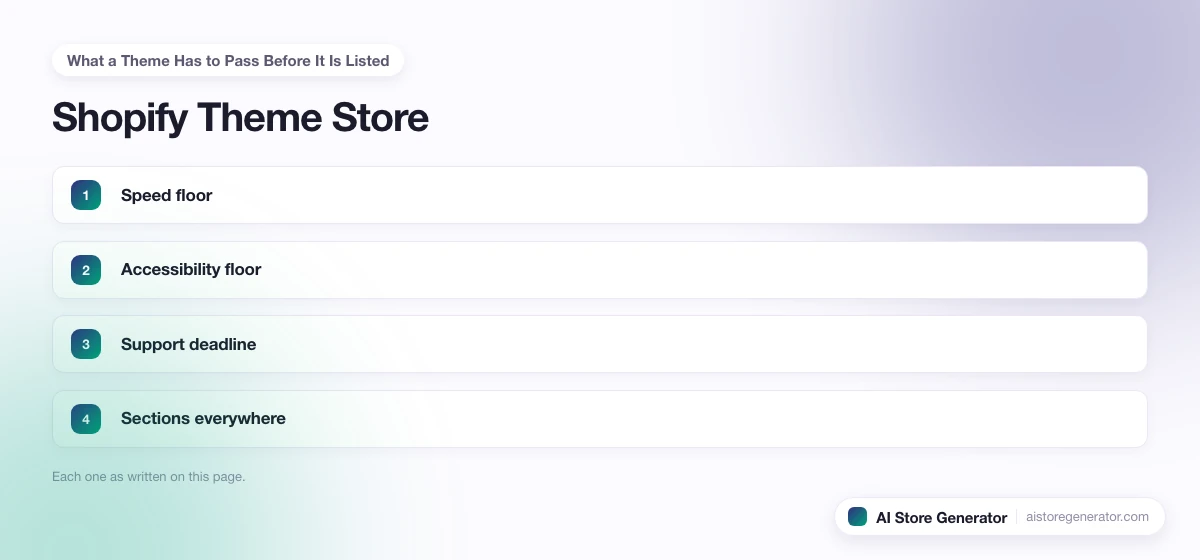
- Speed floor. The theme must average a Lighthouse performance score of at least 60 across its home, product and collection pages, on desktop and mobile, tested with real images and content in place.
- Accessibility floor. The same pages must average a Lighthouse accessibility score of at least 90. Body text needs a contrast ratio of 4.5:1 and tap targets must be at least 24 by 24 pixels.
- Support deadline. The developer must reply to merchant support requests within two business days, and fix critical bugs straight away or risk the theme being pulled from the store.
- Sections everywhere. Every main template has to support sections, so you can add, remove and reorder blocks on any page from the editor without touching code.
Read those numbers the right way round. A performance score of 60 is a floor for getting listed, not a promise that your store will be fast. It is measured on the developer’s demo, and your store will add apps, bigger images and more products. A theme that only just clears 60 on its own demo has very little room left for yours. If speed matters to you, and for search it should, run your own test on the theme’s demo store before you start a trial.
What the listing does give you is the support deadline. A theme bought from an outside marketplace carries whatever support promise its seller chose to make. A Theme Store theme comes with a two business day reply that Shopify enforces.
What Paid Shopify Themes Cost
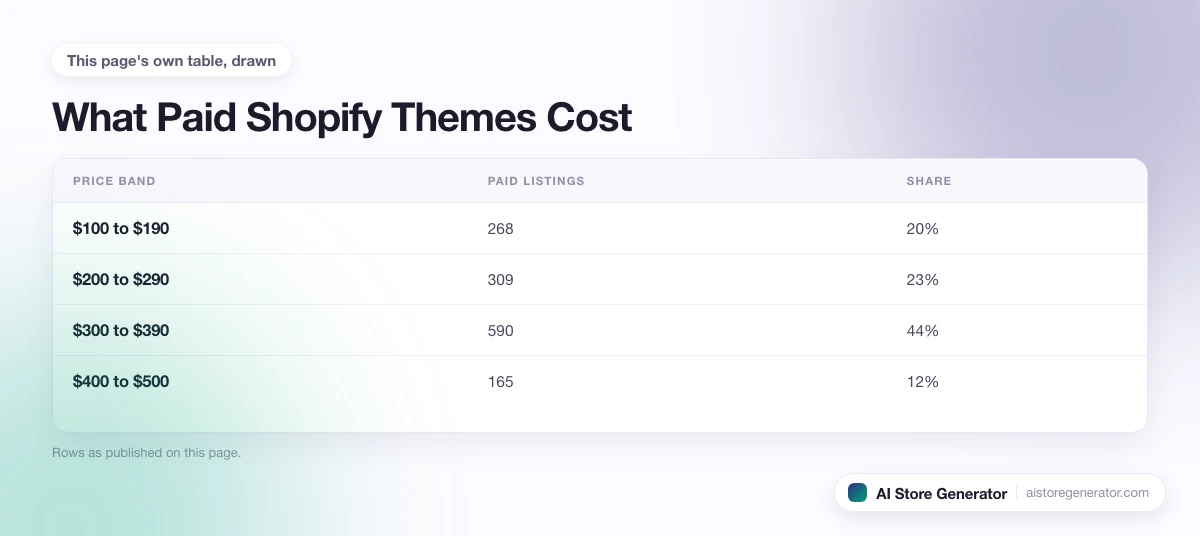
We counted every paid listing in the Theme Store on 30 October 2026: 1,332 of them. Prices ran from $100 to $500, and the middle price was $320. The single most common price was $320, carried by 240 listings. More than half of all paid listings sat between $300 and $420.
| Price band | Paid listings | Share |
|---|---|---|
| $100 to $190 | 268 | 20% |
| $200 to $290 | 309 | 23% |
| $300 to $390 | 590 | 44% |
| $400 to $500 | 165 | 12% |
That is a one-time payment, not a subscription. Theme updates from the developer are included. Your Shopify plan is a separate monthly cost, and so are any apps the theme’s demo relies on to look the way it does.
How the Free Trial Works
You can try any paid theme in the store before you buy it. Click Try theme on the listing and it lands in your admin as a draft, labelled as a theme trial. The rules from there:
- You can trial up to 19 paid themes at the same time.
- Your theme library holds up to 20 themes on the Basic, Grow and Advanced plans, and up to 100 on Shopify Plus. Trials count toward that limit. The Starter plan can only use the Spotlight theme.
- You can preview a trial theme and change its settings in the editor, and those settings are kept if you buy it.
- You cannot publish a trial theme. Customers never see it until you pay.
- You cannot edit the theme’s code while it is on trial.
The trial has no time limit, which is exactly why it gets wasted. People start one, click through the demo pages, and buy. The demo was built to sell the theme, with photography, copy and product counts that are not yours.
How to Use a Trial Properly
We set up Shopify stores for a living, and the theme that wins on demo images is often the one that loses once real supplier photos go in. Square product shots on a theme designed around tall lifestyle images leave awkward gaps everywhere. So test with your own material, in this order:
- Load ten of your real products, with your real photos and descriptions, before you trial anything.
- Start trials on no more than three or four themes, so you are comparing, not browsing.
- Look at a product page and a collection page on your phone first. That is where most of your visitors will land.
- Check the features you need are built in, such as size charts, colour swatches or a mega menu, rather than added by an app you would pay for monthly.
- Run a speed test on the preview with your products in it, not on the demo.
- Only then compare prices, because a $100 difference matters far less than a week of rebuilding.
If you would rather skip the shortlisting altogether, AI Store Generator builds the store for you on a fast theme, with products loaded and pages written, so the trial step disappears.
The Rules That Apply After You Click Buy
Paying turns the trial into a licence, and three rules come with it.
It is final sale. Shopify’s help pages state that paid third-party themes are final sale and that the developer cannot give refunds. Do your testing during the trial, because that is the only refund policy you get.
The licence covers one store. A theme is licensed to the store where you bought it, and it can only be used on one store at a time. If you run two stores, you buy it twice. On Shopify Plus, each storefront needs its own licence too.
Moving it is a one-way door. You can transfer a paid theme to a new store only if you own both, both accounts use the same owner email, and you close the original store. Once the theme has moved, that closed store cannot be reopened. You then buy the theme on the new store and can ask Shopify Support for a refund of the original purchase, which is worked out on what you paid at the time, not on today’s price.
Theme Store Themes vs Themes Sold Elsewhere
Plenty of Shopify themes are sold outside the official store, often for less. The code may be just as good. What you give up is the review: an outside theme has not had to clear Shopify’s speed and accessibility floors, and its support terms are whatever the seller wrote. You also install it by uploading a file, and updates come from the seller, not through your admin.
For most new stores the official store is the safer default, and the price gap shrinks once you count the hours lost to a theme that breaks after an update. Whichever route you take, the guide to Shopify templates and themes explains what the theme controls and what is left to your settings.
Finding the Theme a Store You Like Uses
The fastest shortcut in the Theme Store is to start from a store you already admire. Our Shopify store examples sort 57 well-known stores by what they run, with the price of each theme. Paste its address into our Shopify theme detector and it tells you which theme it runs and whether that theme has a Theme Store listing. If it does, you can trial the same design today. If you are choosing with search traffic in mind, read up on the best SEO theme for Shopify, and for a supplier-led catalogue see the best Shopify theme for dropshipping. Not on Shopify yet? You can start a Shopify store and trial themes from day one.
Frequently Asked Questions
Is the Shopify Theme Store free?
Browsing it is free, and so are the free themes made by Shopify. Paid themes cost a one-time fee. On 30 October 2026 the paid listings ran from $100 to $500, with $320 the most common price.
Can I try a paid Shopify theme before buying it?
Yes. Click Try theme and it is added to your admin as a trial. You can customise its settings and preview it, but you cannot publish it or edit its code until you buy it. Up to 19 paid trials can run at once.
Can I get a refund on a Shopify theme?
Normally no. Paid themes from the Theme Store are final sale, and the developer cannot refund you. The one route Shopify describes is when you transfer a theme to a new store you own and close the old one; you can then ask Support for a refund of the original purchase.
Can I use one theme on two stores?
No. A theme licence covers the store you bought it on, and a theme can only be used on one store at a time. A second store needs its own purchase.
How many themes can I keep in my Shopify admin?
Up to 20 on the Basic, Grow and Advanced plans and up to 100 on Shopify Plus, trials included. The Starter plan is limited to the Spotlight theme.
Do I have to pay again for theme updates?
No. Updates from the developer are included in the one-time price. Updating is easiest if you have customised the theme through the editor rather than by editing its code directly.
Are Theme Store themes faster than other Shopify themes?
Not automatically. Every listed theme has passed a Lighthouse performance average of at least 60 on its demo, which rules out the slowest designs but is a low bar. Test the theme with your own products before you decide. Our guide to SEO ready Shopify themes lists six checks that take about ten minutes.