
AI Store Generator builds your Shopify print on demand store in under five minutes with products loaded, supplier connected, and store designed. No coding. No inventory. No risk.
What Is Shopify Print on Demand?
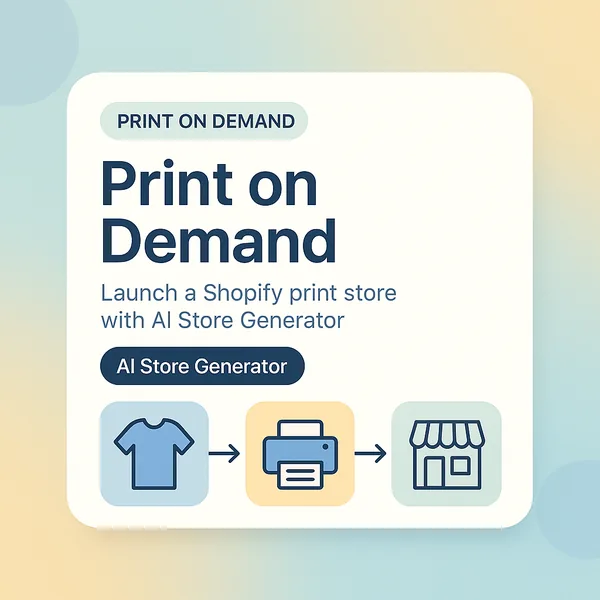
Shopify print on demand is a way to sell custom products online without holding any stock. So you create the designs, a supplier prints and ships each product when a customer orders, and Shopify is the storefront that ties it all together.
Here is how the money works. Your supplier charges a base cost per item, say $9 for a mug. You list that mug in your Shopify store for $24. A customer buys it. The supplier fulfills it. You keep $15. You never touched the mug, never bought it upfront, and never paid for unsold stock.
The model runs without a warehouse, without packing orders yourself, and without minimum order quantities.
How Print on Demand Works on Shopify
AI Store Generator POD Shopify site builder works with Printify. Once you connect the Printify Shopify POD app to your Shopify store, every order that comes in is forwarded to the supplier automatically. They print it, pack it, and ship it directly to your customer under your brand name.
The order flow works like this. A customer places an order in your store. Shopify sends the order details to Printify, which routes it to a print provider near your customer. They print and ship the product, usually within two to five business days. The difference between your sale price and the supplier’s base cost is your profit.
You are not involved in any of those steps after the initial setup.
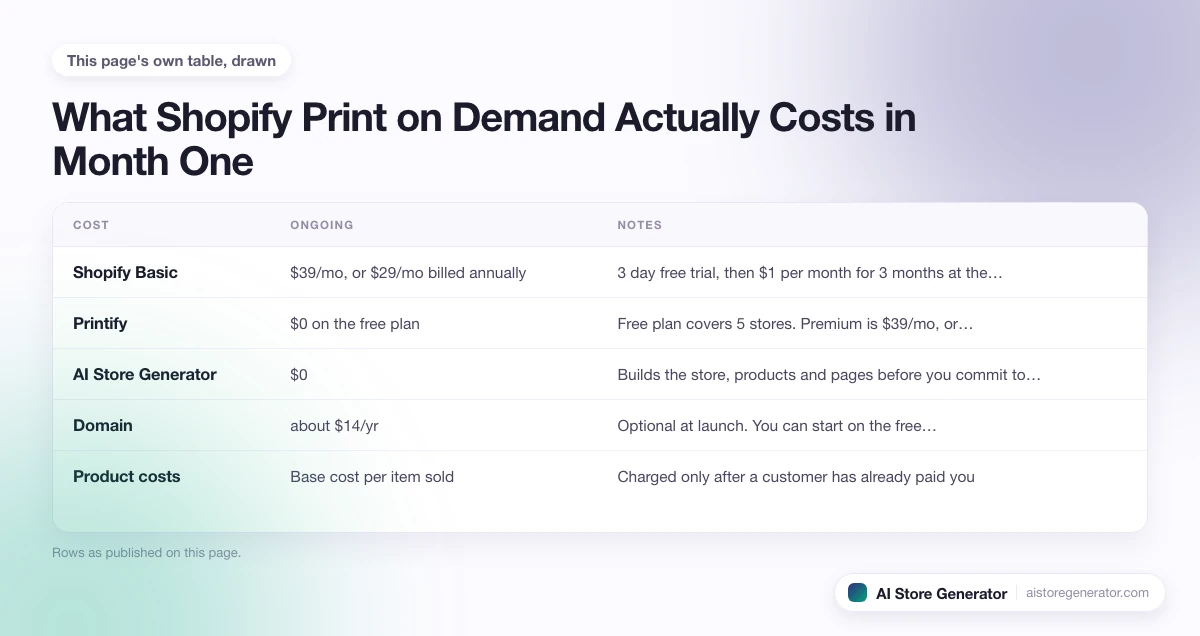
What Shopify Print on Demand Actually Costs in Month One
Most guides answer this with a range so wide it helps nobody. Here is the itemised version, with every figure checked against the providers’ own pricing pages on 29 September 2026. Prices move, so treat the date as part of the numbers.
| Cost | Month one | Ongoing | Notes |
|---|---|---|---|
| Shopify Basic | $1 | $39/mo, or $29/mo billed annually | 3 day free trial, then $1 per month for 3 months at the time of writing |
| Printify | $0 | $0 on the free plan | Free plan covers 5 stores. Premium is $39/mo, or $24.99/mo billed yearly, for up to 33% off product costs |
| AI Store Generator | $0 to build | $0 | Builds the store, products and pages before you commit to anything |
| Domain | about $14/yr | about $14/yr | Optional at launch. You can start on the free myshopify.com address |
| Product costs | $0 | Base cost per item sold | Charged only after a customer has already paid you |
A first month lands near $15, and nothing on that list grows with the number of products you publish. That is the real difference between print on demand and holding stock: your costs follow your sales instead of arriving before them.
What You Need Before You Start
You don’t need design experience, technical skills, or startup capital. So here is what you actually need.
A niche or product idea. The stores that perform well are focused on a specific audience: dog owners, nurses, gym-goers, teachers, fans of a particular hobby. A defined niche means lower advertising costs and customers who connect with your products.
A Shopify account. Basic is $39 per month billed monthly, or $29 per month billed annually. Shopify currently opens with a 3 day free trial followed by $1 per month for 3 months, so the first quarter costs very little. Check the offer when you sign up, because Shopify changes it. Our page on whether Shopify is free covers what you do and do not pay for.
A supplier account. AI Store Generator connects Printify to Shopify for you. The Printify free plan costs nothing and covers up to five stores, so you pay nothing upfront and only owe a base cost once a customer has already bought something. If you want to weigh the alternatives first, our rundown of print on demand companies sets out what each one covers when an order arrives damaged or in the wrong size.
Try AI Store Generator
Create a POD Shopify Store in 5 Minutes
How to Set Up a Shopify Print on Demand Store
Step 1: Go to AI Store Generator and describe your niche
Head to AI Store Generator and tell it what kind of store you want to build. Most stores are ready in under five minutes.
Step 2: Connect your Shopify account
Once your store is built, connect it to Shopify. If you already have an account, link it directly. If not, create one at this stage. The trial is short, currently 3 days, so start it when you are close to ready rather than on the day the idea first occurs to you.
Step 3: Connect Printify
With your store in Shopify, connect to Printify. You only pay the base cost per product when an order comes in.
Nothing needs to be built manually inside Shopify.
Once connected, fulfillment is automatic. Every order is sent straight to your supplier for printing and shipping.
Step 4: Review your products and set your prices
Go through your product catalog and check that everything looks right. Set suggested retail prices based on supplier base costs and typical margins, but you can adjust these to suit your audience.
A reasonable target is a 40 to 60 percent gross margin. If a hoodie costs $22 to produce, listing it at $45 to $50 gives you a workable margin while staying competitive.
Step 5: Connect your domain
A custom domain is worth setting up before you launch. You can buy one through Shopify for around $14 per year, or connect an existing domain from a registrar like GoDaddy or Namecheap. Go to Settings, then Domains, and follow the steps.
Step 6: Set up payments
Go to Settings and then Payments in your Shopify admin. Shopify Payments is the simplest option. It is built in, accepts all major cards, and charges no additional transaction fees. If Shopify Payments is not available in your country, PayPal and Stripe are solid alternatives.
Set up your shipping rates at this stage too. Most POD stores offer free shipping and build the cost into the product price. If you go this route, account for your average shipping cost when setting retail prices.
Step 7: Test your store and launch
Place a test order before you send anyone to your store. Shopify allows this through a test payment gateway so you are not charged. Check that the order flows through correctly to your supplier, your product images look sharp, and your confirmation emails are configured.
Once everything checks out, publish your store. Pinterest, TikTok, and Instagram Reels are the most effective organic channels for new POD stores. SEO builds steadily over time. Paid advertising on Meta or Google makes sense once you have identified a product that converts.
AI Store Generator Uses Printify for Shopify
Printify
Printify is a network rather than a single factory. It connects your store to hundreds of print providers across the US, Europe and beyond and routes each order to one of them, which is why the same POD products can ship domestically to buyers in different countries. The catalog covers apparel, wall art, accessories, stationery and home products, and branding options include custom labels and packing inserts.
The free plan costs nothing and allows five stores, which is where most new sellers should stay. The paid tier only pays for itself once your order volume makes the per-product discount bigger than the subscription. Printify is the Shopify print on demand service we build stores around, because a provider network keeps delivery times and base costs sensible in more countries than one factory can.
What to Sell: Best POD Products for Shopify
The short version, before the detail:
- Apparel for volume: t-shirts, hoodies, caps, embroidered pieces.
- Wall art and home for margin: canvas, posters, cushions, blankets.
- Stationery for repeat buyers: journals, planners, stickers, cards.
- Accessories and gifts for gifting seasons: mugs, phone cases, candles.
Apparel
T-shirts have the highest global search volume of any POD product. Hoodies carry a higher price point and better margins. Hats and caps are inexpensive to produce relative to their perceived value. Leggings and activewear generate strong repeat purchases. One note is that embroidered products face less competition than standard printed apparel and support a higher price point.
Home and wall art
Canvas prints are among the highest-margin POD products and sell consistently as gifts and home decor. Posters have low base costs and are straightforward to produce in volume. Pillows and blankets see strong seasonal sales around Christmas and Valentine’s Day.
Paper and stationery
Journals and planners have active niche communities and consistent repeat purchase rates. Stickers are inexpensive to produce and popular with younger buyers. Greeting cards generate seasonal traffic spikes that repeat every year. Books and booklets work well for stores in the self-publishing space.
Accessories and gifts
Mugs are a top-three POD product globally and a practical starting point for most niches. Phone cases have broad appeal and solid search volume. Candles are a growing gift category with increasing supplier support. Jewelry is an emerging POD niche with room for premium positioning.
Getting Started with Shopify Print on Demand
Print on demand with Shopify is a straightforward business model. No inventory, no upfront product costs, and fulfillment handled automatically once your store is set up. The main work is choosing the right niche, picking products that suit your audience, and getting traffic to your store.
AI Store Generator takes care of the setup. You describe your niche, the AI builds your store, you connect your Shopify account and supplier, and you are ready to sell. The whole process takes under five minutes.
If you have been thinking about starting a POD store, the setup is no longer the obstacle. Go to AI Store Generator and build the best print on demand setup on Shopify.
Frequently Asked Questions
Do I need design skills to start a Shopify POD store?
No. AI Store Generator creates product designs and store visuals as part of the setup. If you want to create your own designs later, Canva is free and straightforward to use.
How much does it cost to start?
Less than most people expect. Shopify Basic is $39 per month billed monthly or $29 billed annually, and the opening offer at the time of writing is $1 per month for the first 3 months. The Printify free plan is $0. A domain is roughly $14 a year. That puts a realistic first month near $15, and the only other money you spend is the base cost of items customers have already paid you for.
When do I get paid?
Shopify pays on a regular schedule depending on your country and payment processor, typically every two to three business days with Shopify Payments.
Can I sell POD products without a Shopify subscription?
No. Shopify requires a paid plan to keep a store live. The free trial gives you time to build and review your store before billing begins.
How long does fulfillment take?
Production typically takes two to five business days. Shipping adds three to seven days for domestic US orders and seven to fourteen days for international. SPOD and Gelato offer the fastest production times.
What makes AI Store Generator different from setting up manually?
Setting up a Shopify POD store manually involves installing apps, browsing supplier catalogs, writing product descriptions, configuring a theme, and setting up shipping. It takes most people several hours at minimum. AI Store Generator handles all of that automatically. You describe your niche, the AI builds the store, and you connect your accounts.
Is print on demand profitable on Shopify?
It can be, and the margin depends far more on the product than on the store. Percentage margins are strongest on low base cost items such as stickers, mugs and posters, while apparel carries a higher ticket but a thinner percentage. What really decides it is traffic cost: a store selling at a 45 percent margin loses money the moment an ad costs more per sale than the margin on the item. The monthly cost side of that sum, worked from the suppliers’ own published prices, is set out in our page on the print on demand business model.
Which Shopify print on demand app should I use?
We build on Printify, because its provider network prints in more countries and that keeps delivery times sensible for buyers outside the US. The notes on the Shopify POD app we use go through how it works and what the alternatives trade off.
How should I price a print on demand product?
Start from the base cost, not from what competitors charge. Add your shipping cost if you advertise free delivery, then set a retail price that leaves a 40 to 60 percent gross margin. Check the result against similar products in your niche. If the number looks too high for that market, pick a product with a lower base cost rather than accept a thin margin.
How many products should a new store launch with?
Fewer than most people think. We see new stores launch with sixty products and sell nothing, because no single product ever got enough attention to be found. Ten to twenty items inside one niche gives you something to test, and you add more once you know which one people actually buy.