
Almost every theme seller calls its theme “SEO ready”, and most guides then hand you a list of theme names. That skips the useful part. Shopify will not list a theme in its Theme Store unless it already meets a set of SEO rules, so the label on a listed theme mostly repeats a promise Shopify already made for it. The differences that matter sit above that floor. To find them, we checked the homepages of 29 Theme Store demo stores on 4 November 2026 and counted what they actually send to Google.
What “SEO Ready” Means on a Shopify Theme
An SEO ready Shopify theme is one that gives search engines a clean, readable page without you editing code. In practice that means four things: the page title, meta description and canonical tag come from your admin settings; products carry structured data that Google can show as a rich result; every image has a place for alt text; and the page loads fast enough on a phone.
None of that ranks a store by itself. A theme decides how your content is presented. It does not write the content, pick the keywords or earn the links. The word “ready” is honest in that sense: the theme is ready for SEO work, not a replacement for it.
The SEO Rules Shopify Already Enforces
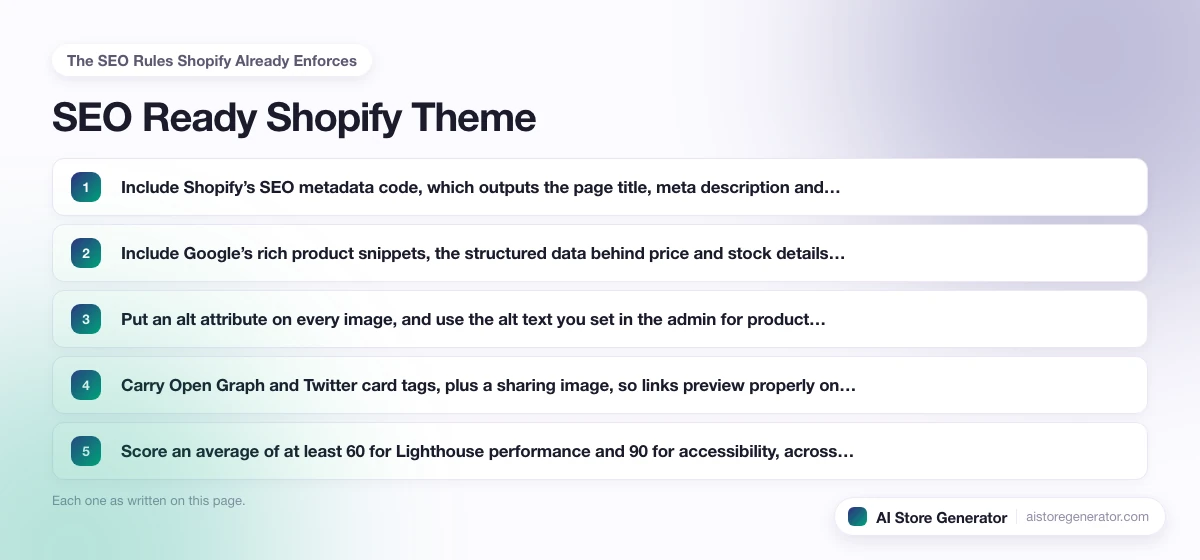
Shopify publishes the rules a theme must pass before it can appear in the Theme Store. Several of them are SEO rules, and they apply to the free themes and the $500 ones alike. Every listed theme must:
- Include Shopify’s SEO metadata code, which outputs the page title, meta description and canonical URL.
- Include Google’s rich product snippets, the structured data behind price and stock details in search results.
- Put an alt attribute on every image, and use the alt text you set in the admin for product images.
- Carry Open Graph and Twitter card tags, plus a sharing image, so links preview properly on social sites.
- Score an average of at least 60 for Lighthouse performance and 90 for accessibility, across the home, product and collection pages, on desktop and mobile.
- Use valid HTML, and leave robots.txt to Shopify rather than shipping its own version.
So if a theme is listed in the Theme Store, those boxes are ticked before you ever see a “SEO optimized” badge. Our guide to the Shopify Theme Store covers what else a listing guarantees, from updates to the licence. Themes bought from outside marketplaces have passed no such review, which is where an SEO claim is worth checking line by line.
Note what 60 means. It is an average across three page types, and it is the minimum to get listed. A theme can pass with a mobile score most store owners would call slow. “Passes Shopify’s bar” and “fast” are not the same sentence.
What We Found Above the Floor: 29 Demo Stores
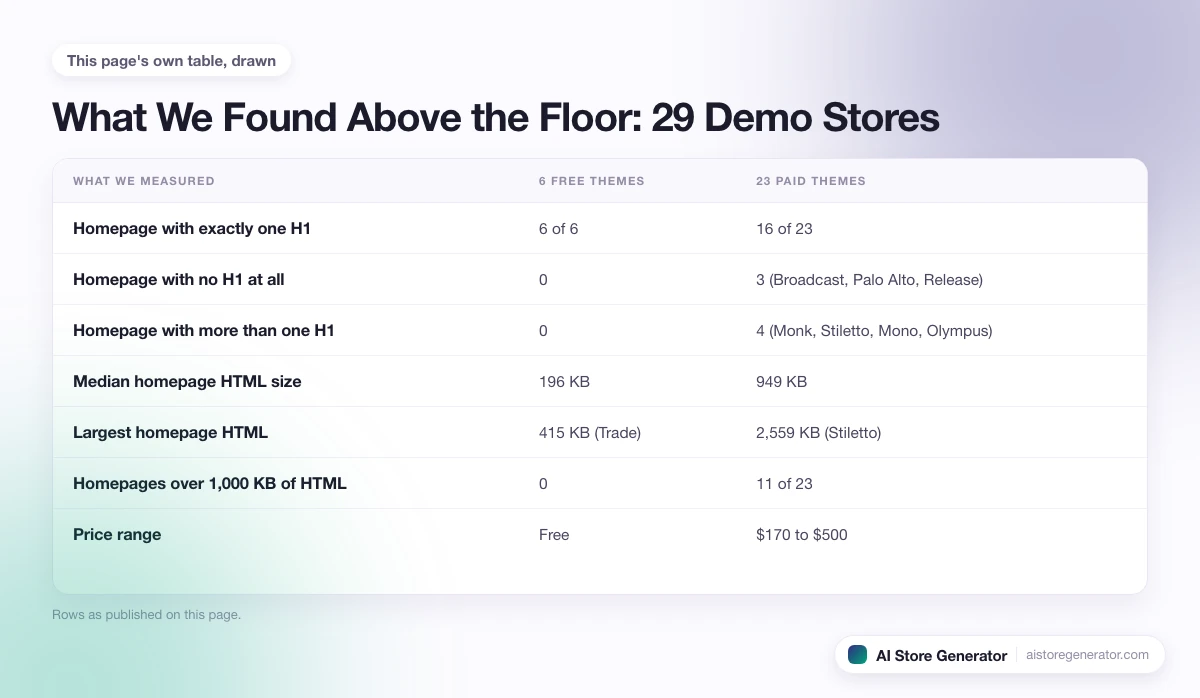
If the rules are shared, what is left to compare? We took 6 free themes and 23 paid themes from the Theme Store, opened each one’s official demo store and looked at the homepage HTML. We counted the H1 headings and measured how much HTML each homepage sends before a single image or script loads.
| What we measured | 6 free themes | 23 paid themes |
|---|---|---|
| Homepage with exactly one H1 | 6 of 6 | 16 of 23 |
| Homepage with no H1 at all | 0 | 3 (Broadcast, Palo Alto, Release) |
| Homepage with more than one H1 | 0 | 4 (Monk, Stiletto, Mono, Olympus) |
| Median homepage HTML size | 196 KB | 949 KB |
| Largest homepage HTML | 415 KB (Trade) | 2,559 KB (Stiletto) |
| Homepages over 1,000 KB of HTML | 0 | 11 of 23 |
| Price range | Free | $170 to $500 |
The free themes were Horizon, Refresh, Sense, Spotlight, Studio and Trade. Dawn, Craft and Be Yours would not return their demo pages during our check, so they are left out rather than guessed.
Headings were the clearest difference
Every free theme sent one H1. Seven paid themes did not. Monk’s homepage carried three H1 tags, one of them a frowning “:(” from an empty-state message and another a product name. One of Stiletto’s three was the line from its newsletter pop-up. Broadcast, Palo Alto and Release sent no H1 at all on the homepage.
Is that a ranking disaster? No. Google copes with odd headings, and some of these can be changed in the theme editor. But it shows that an “SEO ready” badge does not cover the heading outline, and a page that tells Google its main topic is “:(” is not set up the way you would choose.
Page weight did not follow price
The paid demos sent about five times more homepage HTML than the free ones at the median. Weight did not track price, though. Impulse, the most expensive theme we checked at $500, sent 326 KB, lighter than the free Trade demo. Gumdrop, the cheapest paid theme at $170, sent 1,140 KB.
Be fair to the paid themes here: a demo store shows off every section the developer could fit, and your store will not use all of them. Still, the demo is the version the seller chose to show you. If it is heavy there, check how heavy it is with your own content before you buy. Our guide to the fastest Shopify theme splits that weight into the code each theme ships, across 69 themes.
What a Theme Cannot Make SEO Ready
We build Shopify stores for a living, and the SEO problems we find after launch are almost never in the theme. They are in the parts the store owner fills in: product titles copied from a supplier, collection pages with no text, and images uploaded as “IMG_4471.jpg” with the alt field left empty. A theme can only print what you give it.
The same holds for apps. Every app that adds a pop-up, a review widget or a chat bubble adds its own code to every page. That is how a theme that passed Shopify’s speed review ends up slow on a live store. The theme was ready; the store around it was not.
For the work that sits on your side of the line, our Shopify SEO checklist lists the settings and content to finish before launch.
How to Test Any Theme’s SEO Claim in Ten Minutes
You do not need a developer. Open the theme’s demo store, or your own store with the theme in preview, and run these checks on a product page and the homepage:
- Count the H1s. View the page source and search for <h1. You want exactly one, and it should name the page, not a pop-up or a logo.
- Find the product data. On a product page, search the source for application/ld+json. You should see “Product” and an “Offer” with a price. Google’s Rich Results Test will confirm it reads correctly.
- Check the canonical. Search for rel=”canonical”. A product reached through a collection should still point to the plain /products/ address.
- Weigh the page. Run the mobile homepage through PageSpeed Insights. Shopify’s floor is 60; aim higher on the pages you care about.
- Look for breadcrumbs. Some themes offer them as a setting and some do not. They help shoppers and give Google a clear path through your collections.
- Try the alt text field. Add alt text to one product image in the admin, then confirm it appears in the page source.
Want to see what a store you admire is running first? Our Shopify theme detector names the theme, and our Shopify store examples show what 57 well-known stores turned out to be built on.
Free or Paid: Which Is More SEO Ready?
On the evidence we have, the free themes are the safer SEO default. They are lighter and their headings were clean on every demo we read. That matches what we do ourselves: when a new store has no reason to need a feature only a paid theme offers, we start it on a free one and spend the money on products and copy instead. The best free Shopify themes page compares those options.
A paid theme earns its price when it solves a real layout problem, such as a large catalogue, a lookbook or a wholesale price list. Pick it for that reason, then run the six checks above. If you want a ranked shortlist instead, read the best SEO theme for Shopify.
If you would rather not assemble the parts yourself, AI Store Generator builds the whole Shopify store on a clean theme, with products loaded and pages written, so the content a theme cannot supply is there from the start.
Frequently Asked Questions
Are all Shopify themes SEO friendly?
Every theme in the Shopify Theme Store has to meet the same SEO rules to be listed, including title, description and canonical tags, product structured data and a minimum speed score. Themes sold elsewhere have not passed that review, so check them yourself.
Does a Shopify theme affect SEO?
Yes, but less than most people think. The theme controls headings, page weight and how structured data is printed. Your products, collection text, images and links decide far more of how a store ranks.
Is a paid Shopify theme better for SEO than a free one?
Not by default. In our check of 29 demo stores, the free themes sent less homepage HTML at the median and all had exactly one H1. Seven of 23 paid themes did not.
What is the minimum speed a Shopify theme must have?
Shopify requires an average Lighthouse performance score of at least 60 across the home, product and collection pages before a theme can be listed. That is a floor, not a target.
Can I fix a theme that has more than one H1?
Often, yes. Some themes let you change a heading’s size or tag in the theme editor. If the extra H1 sits in a pop-up or the logo, the fix may need a small code edit in the theme files.
Will switching themes improve my Google rankings?
Rarely on its own. A switch helps when the old theme was very slow or had broken headings. If the problem is thin product pages, a new theme just displays the same thin pages faster.