
Most guides answer “how to set up a dropshipping website” by telling you to sign up for Shopify. That part takes about five minutes. The work that actually decides whether the site makes money is everything that goes inside the store after you sign up.
This page treats the website as the product. You will see what pages every dropshipping site needs, how each page should be built, where trust signals go, what changes on mobile, and which mistakes quietly kill conversions. If you have not picked a platform yet, the How to Start Dropshipping on Shopify walkthrough covers the Shopify admin steps separately. Everything below assumes the admin is handled. Now the website itself has to do its job.
What a Dropshipping Website Actually Is
A dropshipping website is an ecommerce store with a particular weakness baked in: you do not control the product, the packaging, or the shipping time.
That weakness shapes every design decision. The customer cannot inspect the product in person. They cannot ask the supplier anything. They are trusting the store, not the brand on the box. So your site has to do the trust work the product cannot.
That means the website needs:
- Clear, written promises about shipping times, returns, and contact
- Product pages that explain the item better than the supplier feed does
- Visual consistency that signals a real brand, not a quickly imported store
- A checkout that does not surprise the customer at the last step
The platform helps. The platform is not enough.
The Pages Every Dropshipping Website Needs
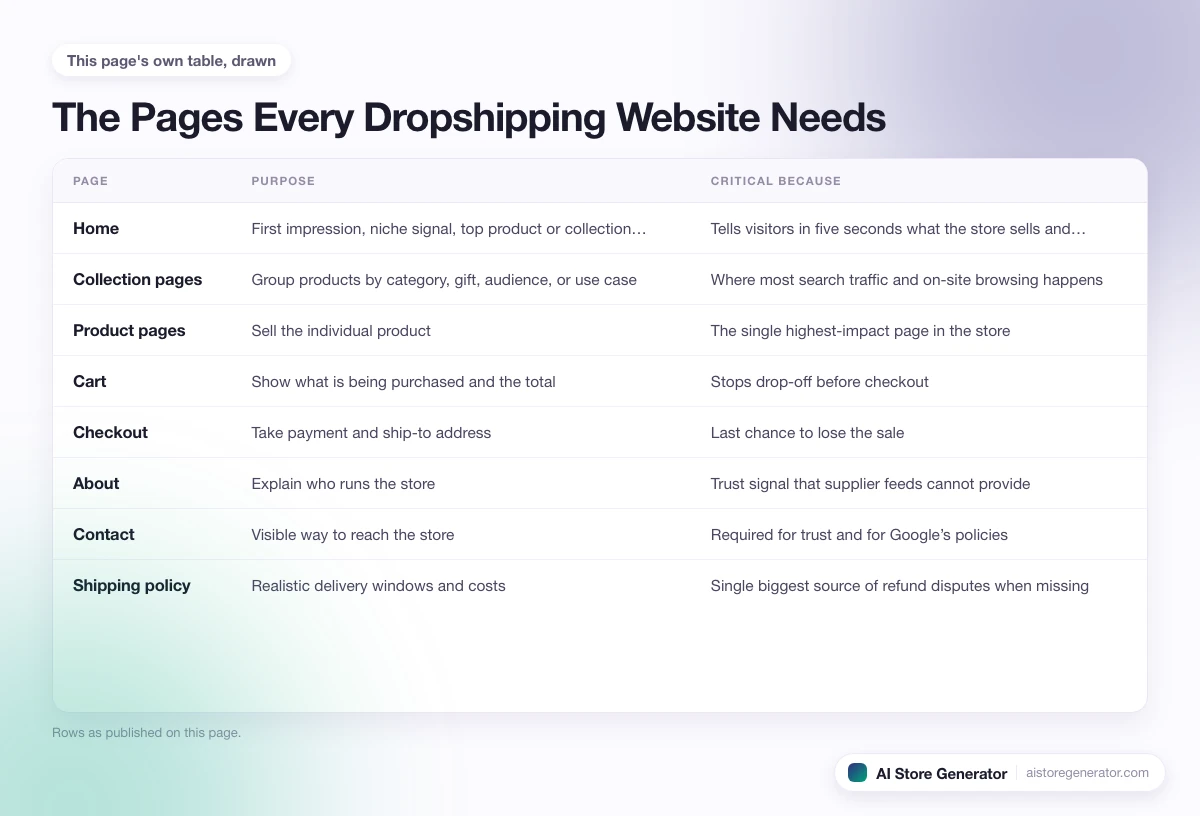
Before you design anything, lock down the set of pages. A dropshipping website that is missing any of these usually fails the trust check.
| Page | Purpose | Critical because |
|---|---|---|
| Home | First impression, niche signal, top product or collection entry | Tells visitors in five seconds what the store sells and to whom |
| Collection pages | Group products by category, gift, audience, or use case | Where most search traffic and on-site browsing happens |
| Product pages | Sell the individual product | The single highest-impact page in the store |
| Cart | Show what is being purchased and the total | Stops drop-off before checkout |
| Checkout | Take payment and ship-to address | Last chance to lose the sale |
| About | Explain who runs the store | Trust signal that supplier feeds cannot provide |
| Contact | Visible way to reach the store | Required for trust and for Google’s policies |
| Shipping policy | Realistic delivery windows and costs | Single biggest source of refund disputes when missing |
| Returns and refunds | What is and is not refundable | Customers check this before buying expensive items |
| Privacy policy | Required by payment processors and ad platforms | Non-negotiable for running ads or selling internationally |
| Terms of service | Legal terms governing purchase | Required by Shopify and most payment processors |
| FAQ | Answers the questions customers ask before buying | Reduces support load and improves conversion |
| Blog or guides | Brings organic traffic and supports SEO | Where long-tail search traffic lands |
Skipping any of the trust pages is the most common reason dropshipping sites get flagged as low quality. The good news is that most of these pages can be written once, in plain language, and reused across stores in similar niches.
Home Page Anatomy
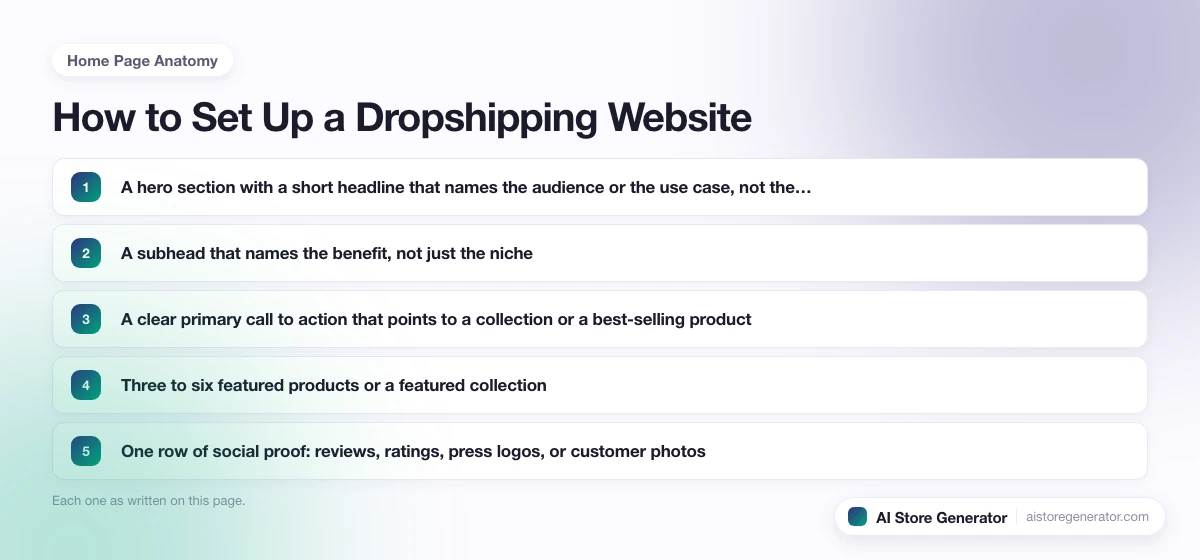
The home page has one job in the first five seconds: tell a visitor what the store sells, who it is for, and why they should keep scrolling.
A strong dropshipping home page usually includes:
- A hero section with a short headline that names the audience or the use case, not the product category alone
- A subhead that names the benefit, not just the niche
- A clear primary call to action that points to a collection or a best-selling product
- Three to six featured products or a featured collection
- One row of social proof: reviews, ratings, press logos, or customer photos
- A short “why us” strip that lists the three or four real differentiators
- A secondary collection block (gift guides, new arrivals, sale)
- A simple footer with policies, contact, and newsletter signup
What does not belong on the home page: long brand stories, supplier pictures, unedited stock photography, or anything that makes the page slow to load on a phone.
Product Page Anatomy: The Page That Decides Whether You Make Money
If you only get one page right, get this one right. Most beginner dropshipping stores fail here.
A high-converting product page includes:
- Product title that uses the words people actually search for, not the supplier’s import name
- Image gallery with at least four images: front, side, in use, and scale or detail
- Price, with original price crossed out if there is a real discount
- Variant selector that does not confuse the buyer (size guide if relevant)
- One-paragraph “why this product” pitch above the fold
- Bullet list of benefits, not just features
- Sticky add-to-cart button on mobile so the customer never has to scroll back up
- Shipping and return information directly on the product page, not buried in a footer link
- Reviews block (real or imported from a review app) with at least the average rating visible
- A short FAQ accordion for the three or four questions customers will ask
- Cross-sell or upsell block that suggests one or two related items
The product description is not the place to copy the supplier text. Write for the buyer. Explain who the product is for, what problem it solves, when to use it, how it compares to alternatives, and what comes in the package. If you import 50 products and rewrite ten product pages carefully, those ten will outperform the other 40 combined.
Collection Pages: Built for Search and Browse
Collection pages quietly do two things: they help customers browse, and they target category-level Google searches.
For each collection, write:
- A short intro paragraph at the top of the page (200 to 400 words) that uses the category keyword and the related questions customers ask
- A clear page title and heading that match what people search for
- Filter and sort options that genuinely help (price, size, color), not every possible filter Shopify can show
- Product cards with consistent image sizes, prices, and add-to-cart or quick-view
- A second short paragraph at the bottom that closes the page and answers the most common follow-up question
A dropshipping site with five well-built collection pages targeting real search terms will outperform one with 30 thin, identical collection pages.
Cart, Checkout, and Trust Pages
The cart and checkout are where most stores lose money. Quick wins:
- Show shipping cost (or “free shipping”) inside the cart, not at the end of checkout
- Allow guest checkout, do not force account creation
- Use a single-page checkout if the platform allows
- Show trust badges (secure checkout, payment methods, return guarantee) on the cart and checkout pages
- Confirm the delivery time estimate one more time at checkout, so there are no surprises
The trust pages (About, Contact, Shipping, Returns, Privacy, Terms, FAQ) are not throwaways. Customers check Shipping and Returns before they buy. Ad platforms check Privacy and Terms before they approve your account. Write each one in plain language. The Shipping page in particular should include realistic delivery windows for every region you ship to. Vague shipping pages are the most common source of refund disputes for new dropshipping stores.
Navigation, Mobile, and Speed
Over 70 percent of dropshipping traffic is mobile. The site has to be excellent on a phone.
Mobile and navigation essentials:
- A simple header with logo, search, account, cart, and a hamburger menu
- Top-level menu links limited to four or five categories
- Sticky add-to-cart on product pages so the button is always reachable
- Tap targets large enough that an adult thumb can hit them without zooming
- Images compressed and lazy-loaded so pages load in under three seconds on mid-range phones
- A search bar that works, not just decoration
- Footer with policies, contact, social links, and newsletter signup
- Breadcrumbs on product and collection pages so visitors can move between levels
Site speed is part of the trust signal. A slow store reads as a low-effort store. Compress images before upload, choose a theme built for ecommerce instead of a multipurpose blog theme, and avoid stacking apps that each add scripts to every page.
Where AI Store Generator Fits
AI Store Generator was built so you do not have to assemble all of the above by hand the first time.
Instead of opening a blank Shopify account and trying to lay out collections, build product pages, write policy pages, and configure navigation from scratch, you describe the kind of store you want. The tool builds a Shopify dropshipping store with products, product pages, collection pages, the standard policy pages, and an SEO-first structure already in place. From there you adjust copy, swap products, edit the home page, and connect Shopify.
You still own the design choices. The starting point is just a built store instead of a blank one.
Common Setup Mistakes
Patterns that show up on almost every failed dropshipping site:
- A home page that does not say who the store is for in the first five seconds
- Product pages that use the supplier’s description and only one supplier image
- Shipping page missing, or written so vaguely that customers raise disputes
- More than five menu items in the header
- Trust badges on the home page but missing from the cart and checkout
- Filters and tags so detailed that the collection pages are slower than the product pages
- A theme designed for blogs, repurposed for ecommerce
- Images uploaded at full size, dragging mobile load time over five seconds
- Auto-imported products with names like “Wireless Bluetooth 5.0 V4.2 Earbuds 2024 New Hot Sale”
- Newsletter popups that fire before the customer has seen anything
If your store has more than two of these, fix those before spending money on traffic. A built store with a clear structure also makes the strategic choices simpler. The dropshipping strategy guide covers how to decide what to sell, to whom, and how to price it once the website itself is in shape.
Frequently Asked Questions
Do I need a custom website or can I use a template?
A good ecommerce template is almost always better than a custom build for a first dropshipping store. Templates from established ecommerce platforms are tested for conversion, mobile speed, and the standard page set. Customise inside the template instead of starting from a blank design.
How many products should I add when I set up a dropshipping website?
Between 15 and 30 products is enough to launch. Choose products you will actually rewrite the descriptions for. A 30-product store with rewritten product pages outperforms a 300-product store of supplier imports.
Do I need a blog on a dropshipping website?
You do not need one at launch, but most dropshipping sites that earn organic traffic over the long run have one. The blog is where long-tail search traffic lands. Plan to add a blog within the first 30 to 60 days.
What pages are legally required on a dropshipping website?
At minimum: a privacy policy, terms of service, and shipping and returns information. Payment processors and ad platforms will not approve a store that is missing these. Some regions also require a contact address and tax information.
Can I set up a dropshipping website without coding?
Yes. Modern ecommerce platforms are no-code, and AI Store Generator builds the standard page set without any coding involved. The only place coding might come up is custom theme edits, and most stores never need them.
How much should the website itself cost to set up?
If you build it yourself on Shopify, the website cost is the monthly Shopify plan, an optional theme, and a few apps. Expect $50 to $150 in monthly platform and app costs once the store is live, before any ad spend.
You Build the Store, Then You Sell
A dropshipping website is the part of the business you actually own. The supplier ships the product. The platform processes the payment. The customer judges everything by the site.
Treat the build as the work, not the formality. The pages, the layout, the navigation, the trust signals, and the speed are what convert visitors into buyers. Once that is in place, the rest of dropshipping is about traffic and iteration.
If you would rather start with a built site instead of a blank one, AI Store Generator gives you the page structure, product pages, and policy pages in minutes. You decide what to keep and what to change from there.