
If your Shopify store isn’t showing up on Google, let’s be honest, it might as well not exist. You could have the most beautiful theme in the world, the slickest logo, and product pages that sparkle, but none of that matters if you’re buried on page 8.
Here’s what no one tells you: most Shopify SEO advice is surface-level. Install this app. Add this tag. Hope for traffic. Rinse, repeat, wonder why nothing’s happening.
The real SEO wins come from deeper tweaks most store owners miss, or flat-out ignore. You don’t need a $3,000/month agency. You just need sharper moves, smarter structure, and a store built to rank from the start. Sure, still do a Shopify SEO audit, but check out these tips too.
These aren’t recycled Shopify SEO 101 tips. These are the low-key, high-impact fixes that quietly separate stores that rank from those that get ignored by the algorithm. Ready? Let’s improve your visibility without breaking your bank (or brain) on SEO services.
10 Best Shopify SEO Tips
1. Fix the Duplicate Content Shopify Bakes In
Shopify loves to duplicate product URLs across multiple collections. Google? Not so much.
If your product sits in more than one collection, Shopify creates several URLs for the same thing (for example /collections/sale/products/x and /products/x). That is duplicate content, and it splits your ranking signals.
Fix it: confirm your canonical tags point to the main product URL. Shopify sets this by default, but themes and apps can break it, so check the <head> source of a product page for rel="canonical". Want it done right automatically? AI Store Generator bakes clean structure in from day one.
2. Stop Using Product Titles as Meta Titles
Google doesn’t want to rank 1,000 pages titled “Black Hoodie – My Brand.” You need clickable, keyword-rich meta titles, not a copy-paste of the product name.
Do this instead: “Lightweight Black Hoodie for Men, Breathable Cotton | My Brand.” Lead with the search term buyers actually type, then the differentiator, then the brand.
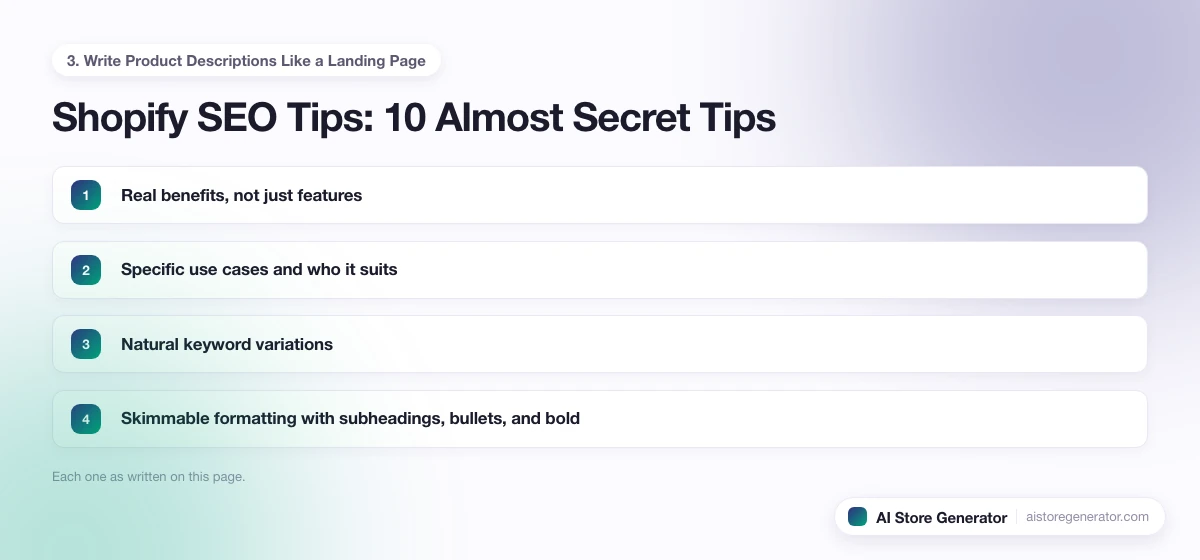
3. Write Product Descriptions Like a Landing Page
If your description is just “Great t-shirt, soft, nice fit,” you’re telling Google the page has nothing new. Use longer copy on your key products that covers:
- Real benefits, not just features
- Specific use cases and who it suits
- Natural keyword variations
- Skimmable formatting with subheadings, bullets, and bold
Aim for 200 or more original words on money pages. That gives Google something unique to index instead of the same supplier blurb every other store uses.
4. Speed Is Everything, Especially on Mobile
Shopify themes get bloated fast. Add too many apps or oversized images and your load time tanks, and Google notices through Core Web Vitals.
Test mobile speed in Google PageSpeed Insights, compress images to WebP, remove apps you no longer use (each one injects script), and pick a fast, minimal theme. Lazy-load below-the-fold images so the first screen paints quickly.
5. Use H1 and H2 Tags Properly (Most Don’t)
Your H1 should appear once, usually as the product or page title. Use H2s and H3s for everything below it. This hierarchy tells Google exactly what the page covers.
Don’t fake headings with bold text. Use real heading tags so both search engines and screen readers can follow the structure.
6. Optimize Your Collection Descriptions
Most owners leave collection pages blank or write a one-liner like “Shop all sneakers.” That wastes your highest-intent category pages.
Write 150 to 300 words with target keywords, internal links to top products, and buyer-friendly copy. Place a short intro at the top and the keyword-rich block at the bottom so it doesn’t push products below the fold.
7. Internal Linking: Still the Most Underrated Tactic
Your product pages shouldn’t live in isolation. Link between collections, related products, blog posts, and your homepage. It helps search engines and customers at the same time.
Example: on a raincoat product page, link to a “Waterproof Gear” collection and a “How to Stay Dry in Fall” post. Use descriptive anchor text, not “click here.”
8. Add Alt Text to Every Image (But Make It Natural)
No keyword stuffing. No “img_29833.jpg.” Just clear, relevant alt text that describes the product and its context.
Weak: “hoodie hoodie hoodie sale.” Strong: “Side view of black cotton men’s hoodie with zipper pockets.” Descriptive alt text also wins Google Images traffic and keeps you accessible.
9. Add Structured Data So You Earn Rich Results
Schema helps Google show pricing, reviews, and availability as rich snippets. Don’t rely on luck: add Product, Breadcrumb, and Review schema through your theme or a reliable Shopify SEO app, then validate each type in Google’s Rich Results Test before you move on.
10. Blog With Buying Intent, Not for the Sake of It
Don’t blog to fill a calendar. Blog to rank for intent that leads to a sale: “how to use,” “best [product] for [use case],” and comparison posts. A few examples worth stealing:
- “Best Hiking Backpacks for Beginners”
- “What to Wear for Cold-Weather Camping”
- “Our Lightweight Jacket vs. a Popular Brand”
Each post should link to the collection or product it supports, so the traffic has somewhere to convert.
3 Advanced Tips Most Shopify SEO Lists Skip
The ten above get you level with well-optimized stores. These three are where you pull ahead, because most guides never mention them.
11. Control Crawl Waste From Shopify’s Auto URLs
Shopify generates URLs you never asked for: tag pages, filtered collection variants like ?sort_by= and ?filter=, internal search results, and vendor pages. Left alone, Google wastes crawl budget on thin, near-duplicate pages instead of your money pages.
Clean it up: add filtered and sorted parameter URLs to a noindex rule where your theme allows it, block internal search result paths in robots.txt, and keep low-value tag pages out of your sitemap. On a small store this barely matters, but past a few hundred URLs it decides which pages Google bothers to index at all.
12. Build Topic Clusters, Not Orphan Posts
One blog post rarely ranks on its own. Search engines reward depth on a subject. Pick a core theme, write one thorough guide, then write several supporting posts that each answer a narrower question and link back to the guide.
For a coffee store that could be a “home espresso” guide supported by posts on grind size, water ratios, and machine cleaning. The internal links between them tell Google you cover the subject properly, which lifts every page in the group.
13. Send the Trust Signals Google Ranks Stores On
Google increasingly weighs how trustworthy a store looks before ranking it. Most tip lists ignore this. Add real customer reviews with Review schema, publish clear shipping and returns policies, show contact details and an about page with a real person or brand behind it, and answer buyer questions on the page with FAQ schema. These signals are the difference between a store Google trusts enough to rank and one it treats as disposable.
Your First 30 Days: A Shopify SEO Plan
Tips only help if you act on them in an order that compounds. Here is a four-week plan that fixes the foundations first, then builds the content and links that earn rankings.
- Week 1, technical base: confirm canonical tags, submit your sitemap in Google Search Console, compress oversized images to WebP, and remove apps you no longer use.
- Week 2, money pages: rewrite meta titles and descriptions on your top ten products and collections, and add 150 to 300 words of original copy to each collection page.
- Week 3, structure: add internal links between related products, collections, and posts, and set descriptive alt text on every product image.
- Week 4, content: publish two buying-intent posts that each link to the collection they support, then validate your Product and Review schema in Google’s Rich Results Test.
Repeat weeks two through four each month on the next set of pages. Within a quarter every important page has original copy, a clean title, and at least one internal link pointing to it, which is exactly what Google needs to crawl and rank a store.
Try AI Store Generator
Build a Shopify Store in 2 Minutes
Frequently Asked Questions
Does Shopify need SEO?
Yes. Shopify handles the technical basics like hosting and SSL, but it does not do keyword research, write your product copy, structure your collections, or build internal links. Those decisions are what actually get you ranked, and they are entirely on you.
Do I need an SEO app for Shopify?
Not necessarily. Apps can help with schema, redirects, and image compression, but the highest-impact work (titles, descriptions, structure, and content) is done in your own settings and pages. Add an app to fill a specific gap, not as a substitute for on-page work.
How long does Shopify SEO take to work?
Most stores start seeing movement in three to six months, with meaningful traffic building after that. New pages need to be crawled, indexed, and then earn enough relevance and links to climb. Building the structure correctly from launch shortens that runway.
What is the most common Shopify SEO mistake?
Leaving collection and product pages with thin or supplier-copied text. Duplicate or empty copy gives Google no reason to rank the page. Rewriting your top pages with original, keyword-aware content is usually the fastest win.
Is Shopify good for SEO compared to WordPress?
Shopify is good for SEO once you set it up well. It gives you fast hosting, clean URLs, SSL, and mobile-ready themes out of the box. WordPress offers more control over URL structure and plugins, but it also needs more maintenance. For a store, Shopify’s trade-offs favor speed and stability, and the ranking factors that matter most, titles, content, structure, and links, are in your hands on either platform.
How many blog posts does a Shopify store need to rank?
There is no fixed number. One useful post that targets a real buying-intent search and links to the right product will do more than twenty thin posts written to fill a schedule. Start with five to ten focused posts built around questions your customers ask before they buy, then expand the topics that start earning impressions.
Can I do Shopify SEO myself without paying an agency?
Yes. Every tip on this page is something a store owner can do without an agency. Agencies mostly save you time, not access to secret tactics. Start with your titles, descriptions, structure, and internal links before spending on outside help.
Conclusion: These Tips Are Built to Rank
You don’t need 27 SEO apps, a billion Shopify SEO tools, and a $2,000/month SEO agency. You need a store built for search: structured for speed and written with intention.
Or better yet, just start with the best SEO theme for Shopify, and that’s already done with AI Store Generator. You get clean code, fast load, proper structure, and pages ready to rank. Skip the tips, start with traction.