
Most beginner advice for starting a dropshipping business jumps straight to picking a Shopify theme or chasing a viral product. That order is backwards. The choices you make before you open a store account are the ones that decide whether the store ever earns money. This page walks through those early decisions, then the real steps from idea to first sale, in the order that actually works.
If you are still working out whether dropshipping is the right model for you at all, the dropshipping basics guide covers that ground first. If you already know you want to start, the steps below are the practical version.
The Short Answer
To start dropshipping, you decide on a customer and a niche, choose a supplier model, pick an ecommerce platform, build a real store with real product pages, and pick one traffic channel to push on. Most of the cost is time. Most of the failure happens in the first three steps, not the last one. The fastest way to learn what works is to finish a real store and ship it, even if it is not perfect.
Decisions to Make Before You Build Anything
The Shopify-specific build steps are covered in Start a Dropshipping Business on Shopify. Before any of that matters, you have four upstream decisions that shape the rest of the project.
Pick a customer, not a product
A product idea like “phone accessories” gives you nothing to write, design, or advertise around. A customer like “commuters who carry a laptop bag every day” gives you a homepage, a product mix, an ad voice, and a content plan. Always work customer-first. The product list follows from the customer, not the other way around. If the category itself is still vague, working through a dropshipping niches framework usually sharpens it.
Pick a supplier model
There are three common shapes:
- Marketplace apps like AliExpress-connected tools. Wide product range, slow shipping by default, lowest setup cost.
- Print-on-demand for apparel, mugs, posters, and accessories. Predictable quality, predictable shipping, smaller margin.
- Private agents or branded suppliers. Faster shipping, better unit economics at scale, more setup work and higher minimum order volume.
Pick one to start. Mixing two on day one creates inconsistent customer experience and harder support. A side-by-side look at dropshipping suppliers for Shopify covers what each option ships, what each costs, and where each tends to break.
Pick a price floor
Before you choose a single product, decide what you will not sell below. A $9 product will not survive paid ads. A $79 product can. Setting a floor early stops you from importing the cheap, easy products that drag the store down.
Pick a country and tax position
Dropshipping is legal in most places, but registration, sales tax, and payment processing rules vary. Decide where you will sell and where you will register before you spend on a logo. Country-specific notes for places like the UAE, Australia, India, and South Africa belong on dedicated pages on this site as they go live, and we will link them as they publish.
Step-by-Step: How to Start a Dropshipping Business
Once those four decisions exist, the rest of starting a dropshipping business looks like a normal launch project.
- Write a one-sentence customer description. Tape it above the desk if you have to. Every other choice gets measured against it.
- Build a 10 to 20 product shortlist. Cross out anything that does not fit the customer, the supplier model, or the price floor.
- Pick an ecommerce platform. Shopify is the default for dropshipping because of supplier app coverage and checkout reliability. Other platforms exist; most beginners pay a tax in setup time when they pick one Shopify is not the default for. If you have already committed to Shopify, the click-by-click Shopify admin walkthrough covers every screen you will touch from signup to launch.
- Reserve a domain and a brand name. Keep it short, easy to spell, and not tied to a single product. You may want to expand the catalog later.
- Build the storefront. Homepage, three to five collections, product pages with real copy, about, contact, shipping, returns, privacy, terms. This is the part that takes the longest by hand.
- Connect a supplier and import products properly. Rewrite product titles and descriptions. Supplier feeds do not convert paid traffic on their own.
- Set up checkout, payments, and shipping rates. Test with a real test order. Beginners who skip this step find out in week two that something was broken in week one.
- Pick one traffic channel and commit for 30 days. Organic SEO, paid social, paid search, niche community, or short-form video. Not all of them.
- Open the store and start collecting real data. A live store with no sales still teaches you more than a draft store does.
The Shopify-specific version of steps 3 through 7 is covered in the click-by-click Shopify admin walkthrough. The point of this list is the order, not the platform. Once the store is public, Shopify dropshipping operations covers the day-to-day work that starts on day one.
How Much Does It Cost to Start Dropshipping?
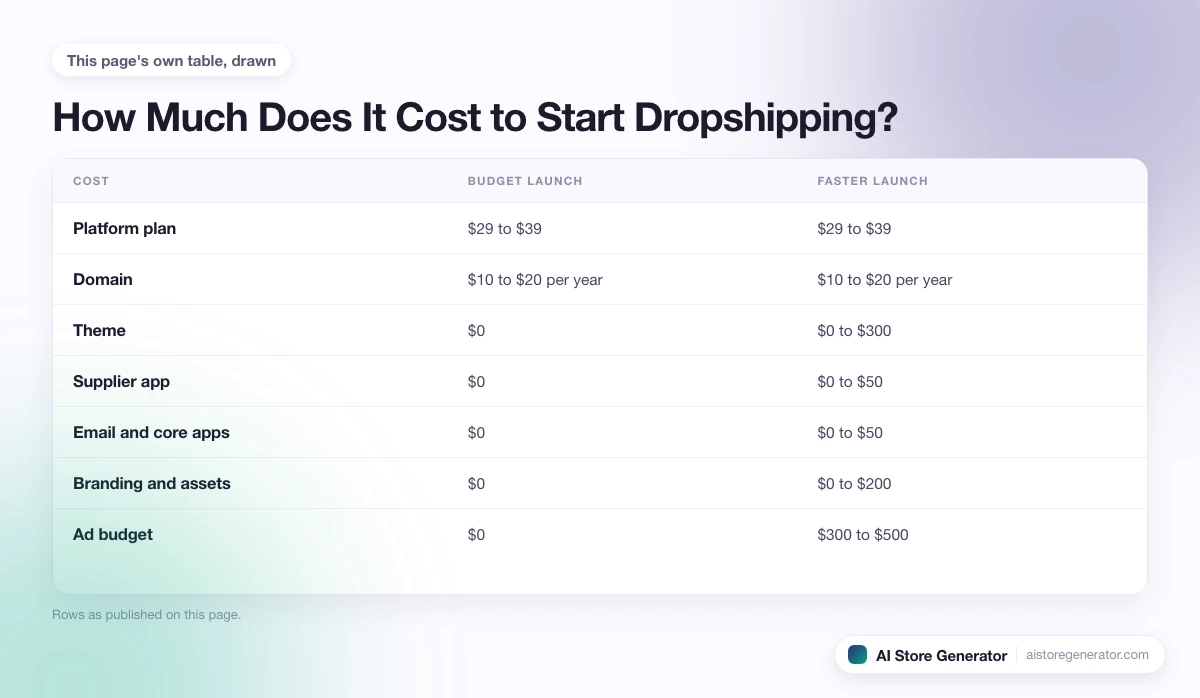
A realistic minimum for a budget launch is around $50 to $150 in the first month if you skip paid ads. A faster, paid-traffic launch lands closer to $500 to $1,000. The numbers below assume Shopify, because that is what most beginners end up on.
| Cost | Budget launch | Faster launch |
|---|---|---|
| Platform plan | $29 to $39 | $29 to $39 |
| Domain | $10 to $20 per year | $10 to $20 per year |
| Theme | $0 | $0 to $300 |
| Supplier app | $0 | $0 to $50 |
| Email and core apps | $0 | $0 to $50 |
| Branding and assets | $0 | $0 to $200 |
| Ad budget | $0 | $300 to $500 |
The bigger cost is time. Building a real storefront by hand takes most beginners 40 to 80 hours before the first product page is good enough to put in front of a paid click. That is the cost almost no guide adds up honestly.
For a deeper budget breakdown by tier, see how much money you need to start dropshipping, which covers the hidden costs and the break-even math behind these numbers.
Where AI Store Generator Fits
Steps 5 and 6 are where most stores stall. Building a homepage, collections, product pages, supporting pages, and writing real copy for everything takes weeks if you do it by hand, and a lot of beginners quit before they finish.
The AI dropshipping store builder handles that part. You describe the store you want, and it builds a Shopify dropshipping store with products, product pages, collections, and an SEO-first structure already in place. Instead of staring at an empty admin panel, you are reviewing a finished store and deciding what to change.
You still own every other decision in this guide. You pick the customer, the supplier model, the price floor, the country, and the traffic channel. The build itself is what gets compressed.
For people who have made the upstream decisions, this turns a multi-week build into a short review session.
Common Mistakes When Starting Dropshipping
Most stores that fail in the first 90 days fail for the same handful of reasons. Knowing the list ahead of time is half the fix.
- Starting with a product instead of a customer. Every later decision drifts without a customer to anchor it.
- Importing 200 supplier products on day one. A focused store of 10 to 30 well-chosen products usually beats a store with a giant catalog.
- Using supplier descriptions as product copy. Pages that read like feeds will not convert paid traffic.
- Pricing on feel. Real prices have to cover product cost, shipping, payment fees, app fees, returns, and ad budget.
- Launching ads to a thin homepage. Ads should land on a real product or collection page.
- Treating SEO as a phase two problem. Late SEO is slow SEO. Internal structure decisions made at launch matter for a year.
- Switching niches every two weeks. Constant pivots stop the store from ever building data.
- Ignoring policies and trust pages. Shipping, returns, and contact pages are not optional for buyers.
- Starting on a platform with weak supplier support. It usually ends in a Shopify migration anyway.
- Confusing learning with launching. Reading another guide is not the same as having a store live.
A Realistic First 30 Days
A week-by-week plan keeps you out of the trap of working on the store in a loose, infinite way.
Week 1: Lock the decisions
- Write the customer sentence.
- Pick the supplier model.
- Set the price floor.
- Pick the country and tax position.
- Shortlist 10 to 20 products that fit all four.
Week 2: Build the storefront
- Reserve the domain and brand name.
- Open the platform account.
- Build the homepage, collections, and product pages.
- Write real copy for every product on the shortlist.
- Add about, contact, shipping, returns, privacy, and terms pages.
Week 3: Wire up the back end
- Connect supplier and place a test order to yourself.
- Configure checkout, payments, and shipping rates.
- Set up basic email flows for abandoned cart, welcome, and order confirmation.
- Add core analytics and conversion tracking.
- Run a final review against a launch readiness checklist.
Week 4: Open the store and start one traffic channel
- Open the store to the public.
- Pick one traffic channel and commit for the next 30 days.
- Publish or push the first content, ads, or community posts.
- Collect data daily and write down what you change.
The point is not perfection in 30 days. The point is a real store, in front of real people, with real data coming back.
Frequently Asked Questions
Can you start dropshipping with no money?
Almost no money is more honest. A platform plan, a domain, and a payment method cost real dollars. You can avoid paid ads and paid themes at the start, but a budget below roughly $50 in the first month is fragile and usually ends in a stalled store.
How long does it take to start a dropshipping business?
For most beginners building by hand, four to eight weeks from idea to a public store with real products and real copy. The biggest delay is product pages and supporting content, which is the part the AI dropshipping store builder compresses.
Do you need a registered business to start dropshipping?
In many countries you do not need a registered company on day one. You usually do need one before scaling, before adding a brand bank account, or before crossing local tax thresholds. Rules vary by country, and country-specific guides are the right place to confirm before you launch.
Should you start on Shopify or somewhere else?
For dropshipping specifically, Shopify is the default because supplier apps, checkout reliability, and theme ecosystem are built around it. Other platforms can work for specific niches, but most beginners end up migrating to Shopify after the first or second supplier issue.
What is the single biggest mistake when starting dropshipping?
Importing dozens of supplier products before deciding who the store is for. Every later problem (thin copy, weak ads, no SEO traction, hard support) traces back to that one.
Build the Store Once the Decisions Are Made
The decisions above are the part only you can make. The store build is the part that usually drags out for weeks and quietly burns the motivation to keep going. If the upstream choices are locked in, the AI dropshipping store builder can produce a finished Shopify dropshipping storefront with products, copy, collections, and an SEO-first structure for you to review, edit, and launch. The decisions stay yours. The build stops being the bottleneck.