
Automating a Shopify dropshipping store is what turns it from a second job into a business you actually run. In the early days you can forward orders by hand, copy tracking numbers one at a time, and check stock yourself. That works until it doesn’t. Somewhere around the twentieth or thirtieth order a day, the manual work stops being possible and starts costing you sales.
The good news is that almost every repetitive task in a dropshipping store can run on its own. Order routing, tracking updates, stock syncing, and price changes can all happen without you touching them. The trick is knowing what to automate, what to keep in your own hands, and in what order to set it all up.
This guide walks through exactly that. You will see what you can automate, what you should not, how to set up order fulfillment step by step, which apps do what, and how much it costs. By the end you will have a clear plan for a store that mostly runs itself.
The Short Answer
You automate a Shopify dropshipping store by connecting a supplier app that handles four jobs for you: importing products, forwarding orders to the supplier, syncing stock and prices, and pushing tracking numbers back to customers. Apps like DSers, AutoDS, Zendrop, Spocket, and CJdropshipping each cover most of this. You set the rules once, run a test order, and then let the system handle the repetitive work.
Automation does not run the whole business for you. It removes the busywork so your time goes to the parts that actually grow the store: traffic, products, and customer care.
What You Can Actually Automate
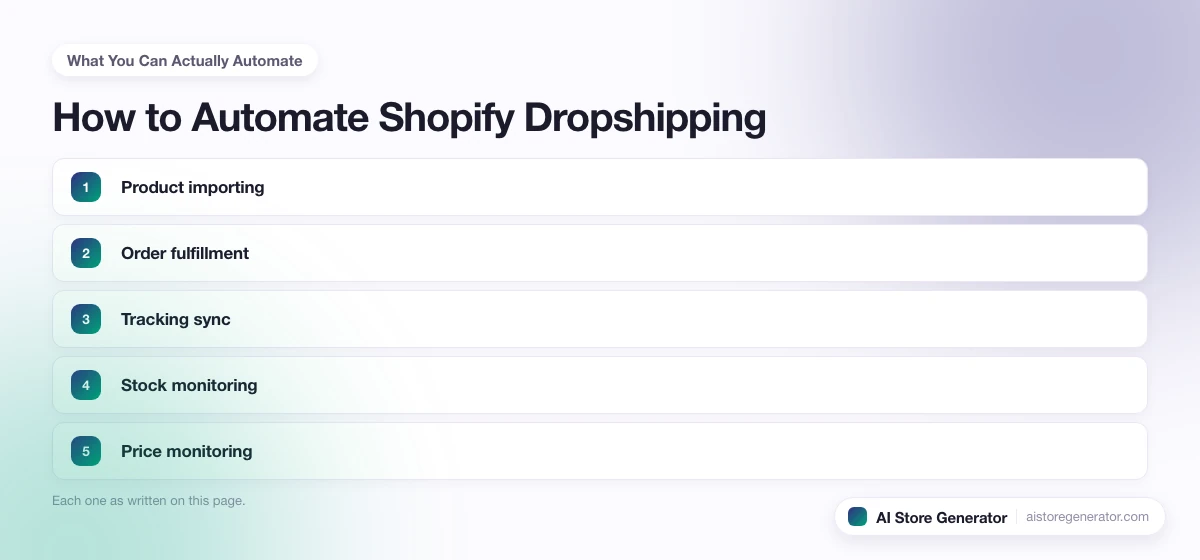
Most of the daily grind in a dropshipping store falls into a handful of jobs. Each one can run automatically once it is set up:
- Product importing. Pull product details, images, and variants from a supplier into Shopify in one click instead of copying them by hand.
- Order fulfillment. When a customer buys, the order is sent to the supplier and paid for automatically, with no manual placing.
- Tracking sync. The supplier’s tracking number flows back into Shopify and out to the customer email on its own.
- Stock monitoring. When a supplier runs out, the product is hidden or marked unavailable so nobody buys what cannot ship.
- Price monitoring. If a supplier raises its cost, a rule can lift your retail price to protect the margin.
- Customer emails. Order confirmation, shipping updates, and review requests send themselves through Shopify Email or a similar tool.
- Weekly reporting. A scheduled summary of sales, refunds, and top products lands in your inbox without you pulling it.
Set up well, these seven jobs cover the bulk of a store’s daily work.
What You Should Never Automate
Guides written by app companies rarely mention the flip side, because their goal is to sell you more automation. The truth is that some parts of a dropshipping store get worse when you hand them to a machine. Keep these in your own hands:
- Real customer complaints. A damaged item, a wrong order, or an angry message needs a human reply, not a canned template. This is where you keep customers.
- Refund judgment calls. Auto-refund rules sound tidy until they refund fraud or miss a genuine problem. Decide these case by case.
- Product testing decisions. Software can flag a slow seller, but choosing what to test next is a strategy call that depends on your market.
- Supplier disputes. When a supplier ships late or sends the wrong goods, you negotiate. An app cannot.
- Aggressive repricing. Letting a tool freely change prices can wreck your margins or scare buyers. Set caps and review the changes.
A simple rule: automate the tasks that are the same every time, and keep the tasks that need judgment.
AI tools blur that line, because they make judgment calls rather than repeating a task. If you are adding AI on top of this setup, what to let AI decide in a dropshipping store sorts those calls by how long a wrong one stays invisible.
How to Automate Order Fulfillment Step by Step
Order fulfillment is the automation that matters most, because it is the task that breaks first as you grow. Here is the setup, start to finish:
- Pick a supplier that supports automation. Not every supplier connects to Shopify. Choose one with an official app or integration before you build anything else. The guide on how to find dropshipping suppliers covers what to look for.
- Install the supplier’s Shopify app. DSers for AliExpress, AutoDS for multiple sources, or Zendrop and CJdropshipping for their own catalogs. Connect it to your store from the Shopify App Store.
- Import and map your products. Bring products in through the app and confirm each Shopify product is linked to the correct supplier item and variant. Wrong mapping sends the wrong product on every order.
- Set your pricing rules. Tell the app how to price: a fixed markup, a multiplier, or a rule that holds a set margin as costs move.
- Load a balance or connect payment for auto-ordering. Auto-fulfillment needs a way to pay the supplier. Most apps ask you to load a balance or link a card so orders place themselves.
- Turn on auto-ordering and tracking sync. Flip the switches that send orders automatically and pull tracking numbers back to the customer.
- Place a test order. Buy something on your own store. Confirm the order reaches the app, goes to the supplier, returns a tracking number, and fires the customer email. Never trust automation you have not tested.
Once a test order runs clean, your fulfillment is on autopilot for as long as the product mapping stays correct.
Automation Apps Compared
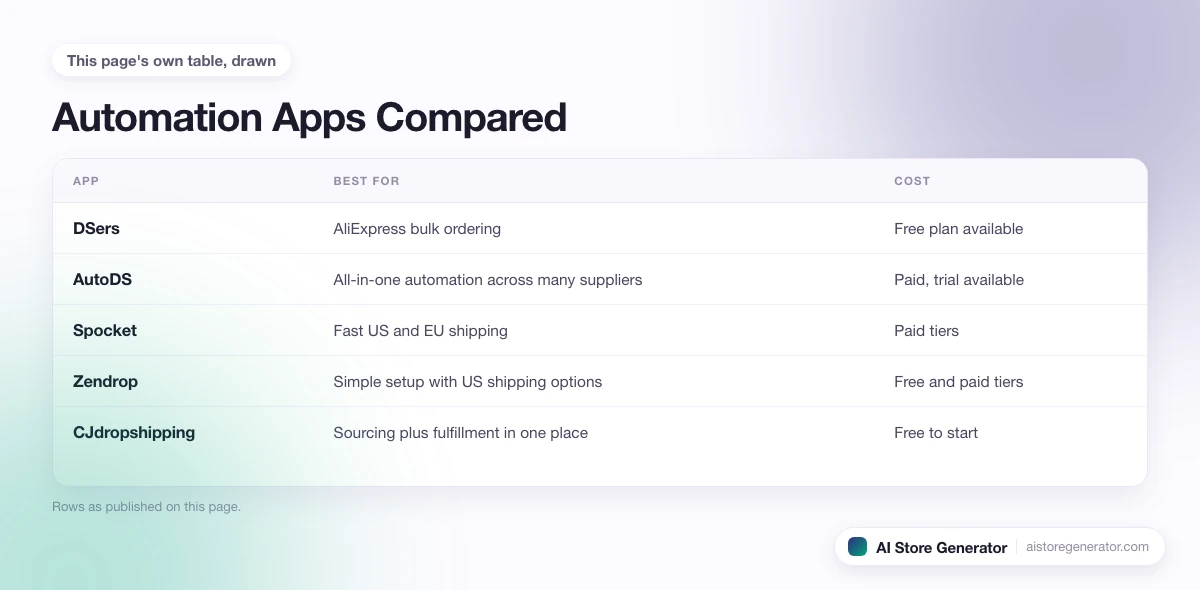
No single app is best for everyone. The right one depends on your supplier and how much you want automated. Here is how the common choices compare:
| App | Best for | Cost | Note |
|---|---|---|---|
| DSers | AliExpress bulk ordering | Free plan available | Common starting point, single-source focus |
| AutoDS | All-in-one automation across many suppliers | Paid, trial available | Widest feature set, higher price |
| Spocket | Fast US and EU shipping | Paid tiers | Higher product cost, quicker delivery |
| Zendrop | Simple setup with US shipping options | Free and paid tiers | Beginner friendly |
| CJdropshipping | Sourcing plus fulfillment in one place | Free to start | Good for custom sourcing |
DSers is the usual first pick because it is free and covers AliExpress well. As the store grows, many owners move to an all-in-one tool for tighter control over pricing and stock.
What to Automate First
You do not automate everything on day one. Setting up advanced repricing before you have made a sale is wasted effort. Match the automation to the stage the store is in:
Just launched, zero to five orders a day. Automate the basics only: product importing and the standard customer emails. At this volume you can place orders by hand, and doing so teaches you how the supplier actually behaves.
Finding traction, five to forty orders a day. This is the moment order fulfillment automation earns its keep. Turn on auto-ordering, tracking sync, and stock monitoring. Manual order placing becomes a bottleneck right around here.
Scaling, forty or more orders a day. Add repricing rules, a backup supplier for top products, and automated reporting. At this stage small margin leaks add up fast, so the monitoring tools pay for themselves.
Automating in this order means you never pay for tools you are not ready to use, and you learn the manual version of each task before you hand it off.
What Automation Costs
Automation is not free, but it is cheap next to the time it saves. A realistic monthly setup for a growing store looks like this:
- A supplier automation app: free to around forty dollars a month, depending on the plan and product count.
- Email automation: often free at low volume through Shopify Email, or a small monthly fee as your list grows.
- Optional extras like a reviews app or a helpdesk: usually ten to thirty dollars each.
Most stores run a working automation setup for under fifty dollars a month early on. The cost rises with order volume, but so does the revenue that pays for it. The mistake is not the spending. It is paying for advanced tools before the store is ready to use them.
Common Automation Mistakes
Automation fails in predictable ways. Watch for these:
- Auto-fulfilling out-of-stock items. Without stock sync, the app keeps ordering products the supplier cannot ship. Every one becomes a refund.
- Repricing with no limits. A loose repricing rule can push prices to numbers that kill sales or margins. Always set a floor and a ceiling.
- Ignoring the inbox because it feels handled. Automated emails do not answer real questions. Customers still need a human reply within a working day.
- Wrong product mapping. One mismatched variant sends the wrong item on every order for that product. Check mapping after any import.
- Trusting it without testing. The single biggest mistake is switching automation on and assuming it works. Always run a test order first.
Every one of these has a one-time fix. The stores that struggle are the ones that set automation once and never check it again.
Where AI Store Generator Fits
Automation only works as well as the store underneath it. Auto-ordering means nothing if the product pages are thin, the policies contradict the supplier, or the collections are a mess. Automation moves orders through a store. It does not build a good one.
That is the part AI Store Generator handles. It builds the Shopify foundation for you: product pages, collections, ready-to-sell pages, policy pages, and an SEO-first structure, in a few minutes. With that base in place, the automation apps have something solid to plug into. You spend your setup time connecting fulfillment and pricing rules, not rebuilding store basics by hand.
What to Do Next
Automation is one piece of running a store well. Once fulfillment and tracking are on autopilot, the rest of the day-to-day operations of a dropshipping store, from pricing to returns to customer support, is where your attention goes next. If the store is not live yet, start with setting up your dropshipping website and then layer automation on top.
When you are ready, the fastest path to a store worth automating is to let AI Store Generator build the foundation, then connect the tools above. Build the store today and set up the automation once it has real orders to handle.
FAQ
Can you fully automate a dropshipping store?
You can automate most of the daily work: importing products, placing orders, syncing stock and prices, and sending tracking updates. You cannot automate the parts that need judgment, such as real customer problems, supplier disputes, and product decisions. A store that runs those on autopilot loses customers fast.
What is the best app to automate Shopify dropshipping?
It depends on your supplier. DSers is the common free choice for AliExpress. AutoDS is a strong all-in-one paid option across many suppliers. Spocket suits stores that need faster US and EU shipping. Start with a free tool and upgrade when order volume justifies it.
How much does dropshipping automation cost?
Most stores spend under fifty dollars a month early on. A supplier automation app runs from free to about forty dollars a month, and email automation is often free at low volume. Costs rise with order volume, but the extra revenue usually covers the extra tools.
Can you automate dropshipping for free?
Partly. DSers has a free plan that covers AliExpress importing and order automation, and Shopify Email handles basic customer emails at no cost. Free tiers have limits on products and features, so growing stores usually move to a paid plan for stock monitoring and repricing.
Does automation mean the store runs without me?
No. Automation removes repetitive tasks so you can focus on traffic, products, and customer care. You still handle real customer messages, supplier issues, pricing strategy, and growth. Think of it as removing the busywork, not the owner.
How do I automate order fulfillment on Shopify?
Install your supplier’s Shopify app, import and map your products, set pricing rules, load a balance for auto-ordering, then turn on auto-fulfillment and tracking sync. Always place a test order to confirm the whole chain works before you rely on it.